
If your organization runs multiple companies within Microsoft Dynamics 365 Business Central, you've likely felt the friction of standard Master Data Management (MDM) and Intercompany (IC) processing. Setting up MDM synchronization means configuring each company separately, exporting and importing setup files, and switching between companies just to check status. Meanwhile, standard IC processing leaves out details like location and lot tracking, doesn't enforce data integrity across companies, and requires manual steps at nearly every stage of a transaction. The Acumens IC Suite — Acumens IC Automation and Acumens Intercompany Enhancements — was built to solve both sets of problems.
Acumens IC Automation and Acumens Intercompany Enhancements extend Business Central's standard MDM and IC processes to achieve: centralized, automated MDM synchronization setup and governance; full contact synchronization, which standard MDM doesn't fully support; and a set of IC processing automations and enhancements that remove manual work from intercompany purchase, sales, and document workflows.
Manage MDM Setups from a Central Company
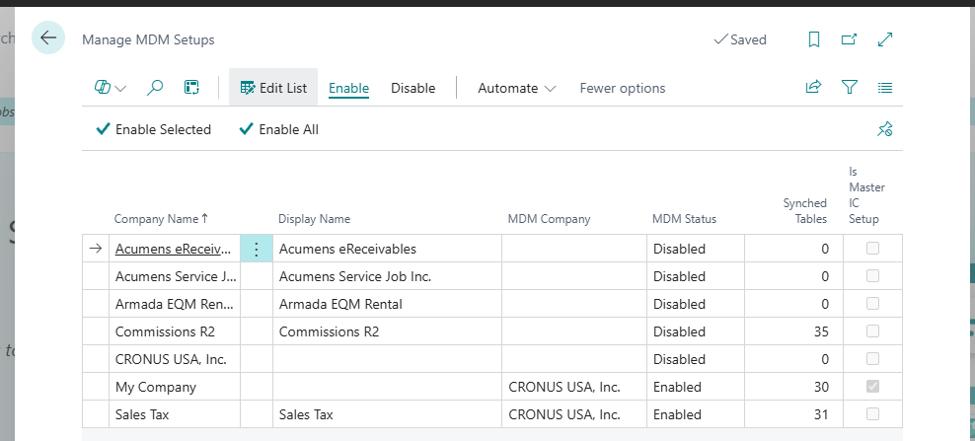
A single setup page lists every company in the tenant, showing its MDM status, designated MDM company, and number of enabled sync tables. Changes made here — enabling/disabling sync or switching the MDM company — are replicated to the relevant companies automatically.
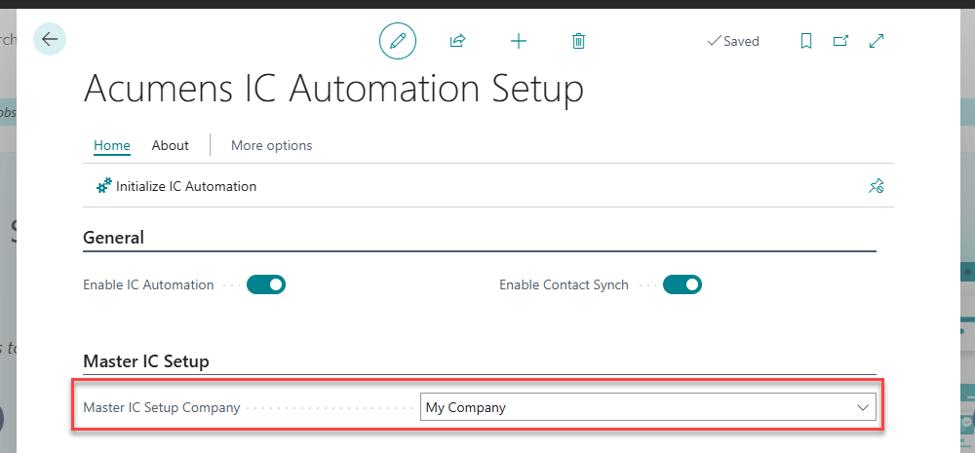
Set the central company from where all setups will be managed.
Open the Manage MDM setups page. Control everything MDM from here
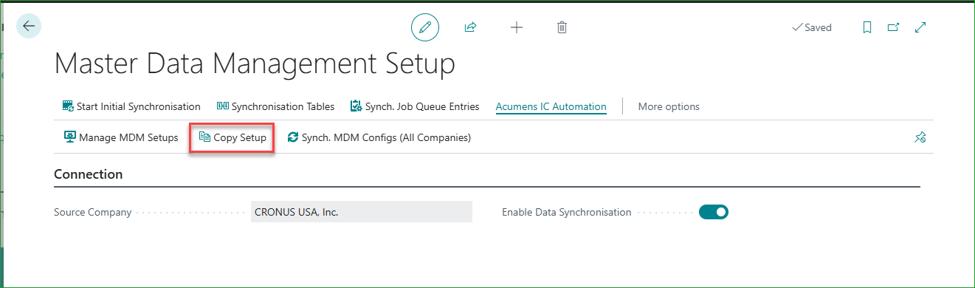
Copy Setup
Configure your table and field sync setup once — matching criteria, enabled/disabled fields, overwrite rules — then copy that configuration to one or many companies in a single action. The copied setup is clean and ready to sync immediately once MDM is enabled.
In the source/setup company, go to Copy Setup.
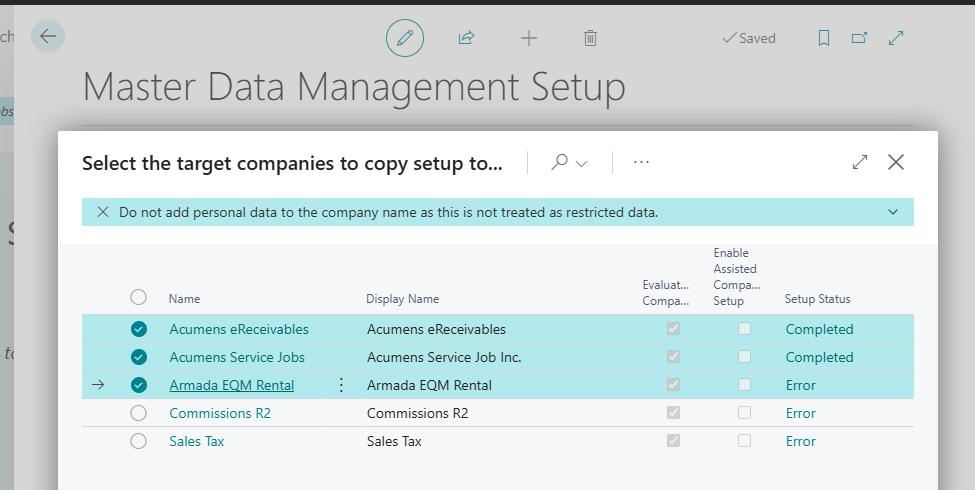
Select destination company(ies) then click Ok. The synch tables and their parameters/criteria will be copied to the selected company(ies), ready to synch.
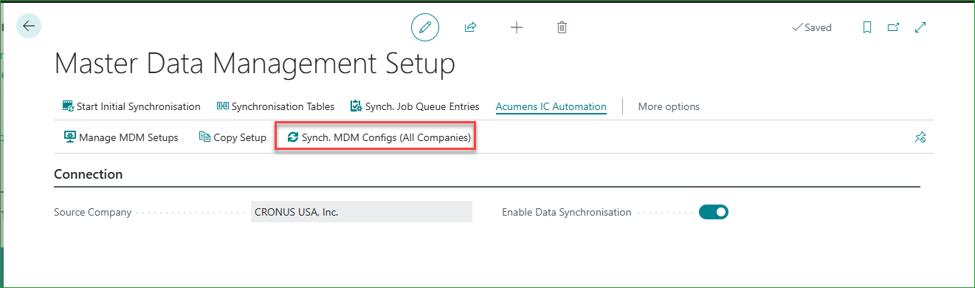
Synch. MDM Configs (All Companies)
Refreshes synced tables and couplings across all companies from one place: updating fields, recreating couplings, cleaning up setups, and re-syncing previously failed records, with progress dialogs throughout. This forces stuck records to sync without further manual intervention.
Open the action.
Confirm selection.
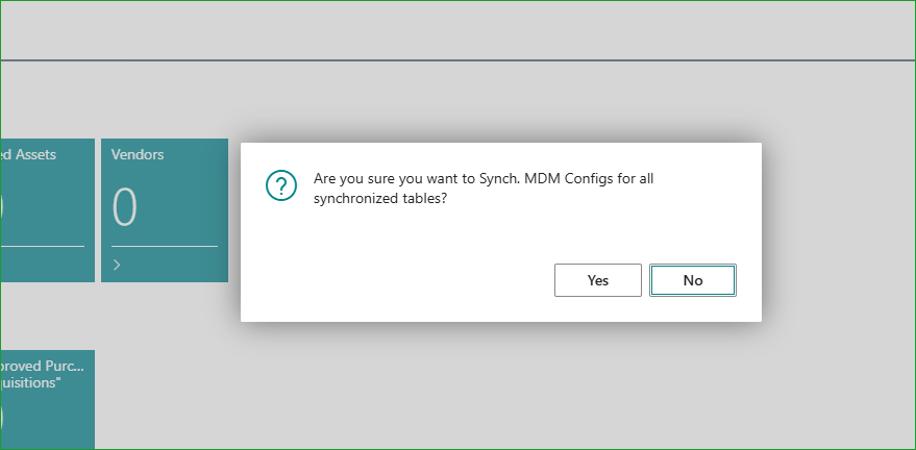
The synch. process is then executed with user dialogs for progress update and user action prompt. When done, synched records will be updated, copying over any records that had failed to synch, and ensuring that subsequent records will synch without fail.
MDM Validation
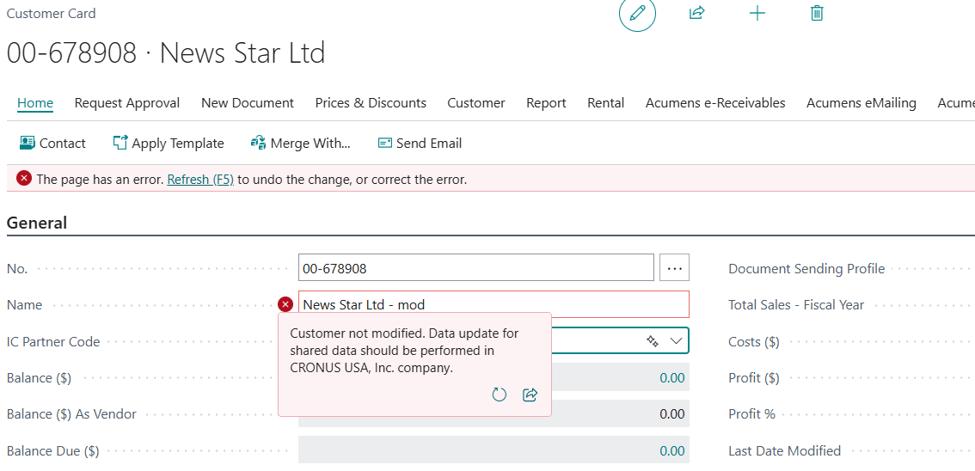
Adds data governance on top of synchronization: it prevents local edits to shared master data (changes must happen in the master company), blocks deletion of master records that have related transactions in subsidiaries, and automatically cascades deletion of non-transactional subsidiary data when a master record is removed.
Changes restricted to master company to ensure data integrity and consistency
MDM Contact Synch
Standard MDM doesn't synchronize company contacts. This feature closes that gap, automatically synchronizing all contact changes between master and subsidiary companies.
The contact and contact business relation synchronization is designed to work without errors whether the main record exists in the subsidiary company or not.
When a contact is created in master company, a contact synch log is automatically created and synchronized to subsidiaries.

The contact log in subsidiary is used to create a matching contact record and contact business relation.

Automated IC Mapping
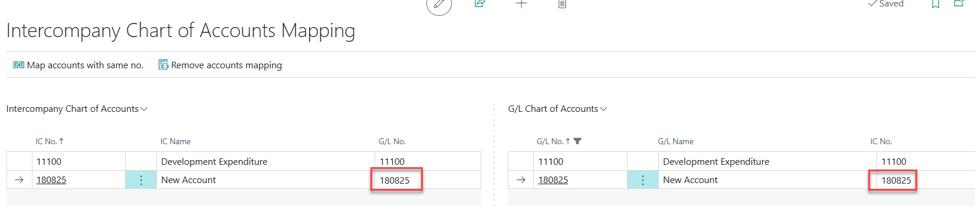
New G/L accounts and dimensions created in one company are automatically copied and mapped in the intercompany chart of accounts, removing manual setup for every new account.
Create account in Chart of Accounts.

Automatically mapped to IC Chart of Accounts ready to sync
IC Location Transfer
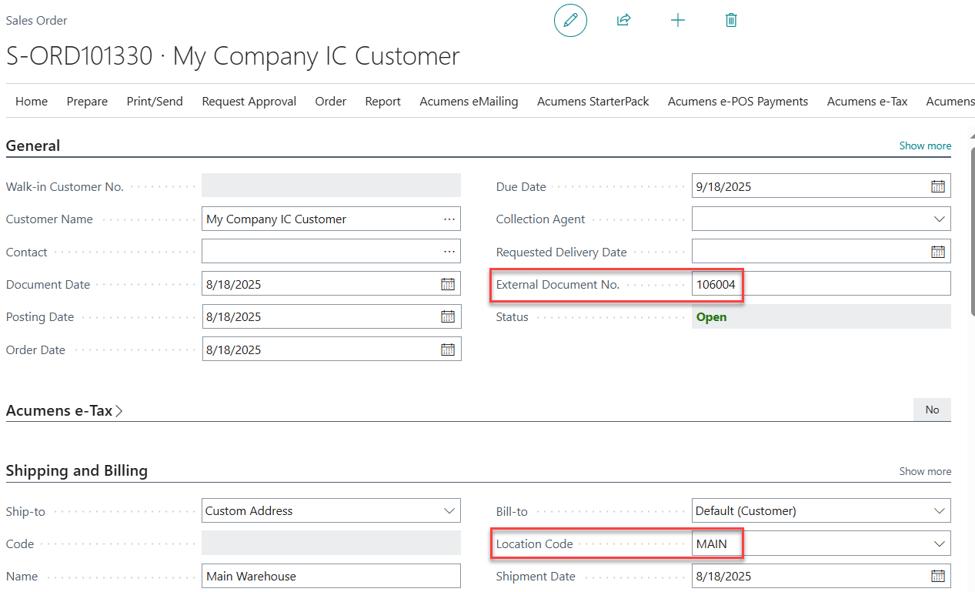
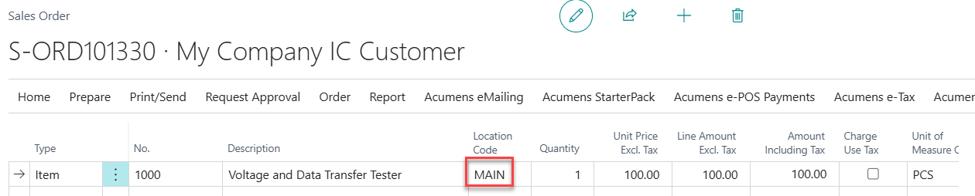
Carries the Location Code from sending to receiving partner on intercompany purchases and sales — a detail standard IC processing omits — ensuring the location specified on headers and lines is reflected in the resultant document.
Create and post an IC document, like a Purchase Order, with Location Code specified in header and/or lines.
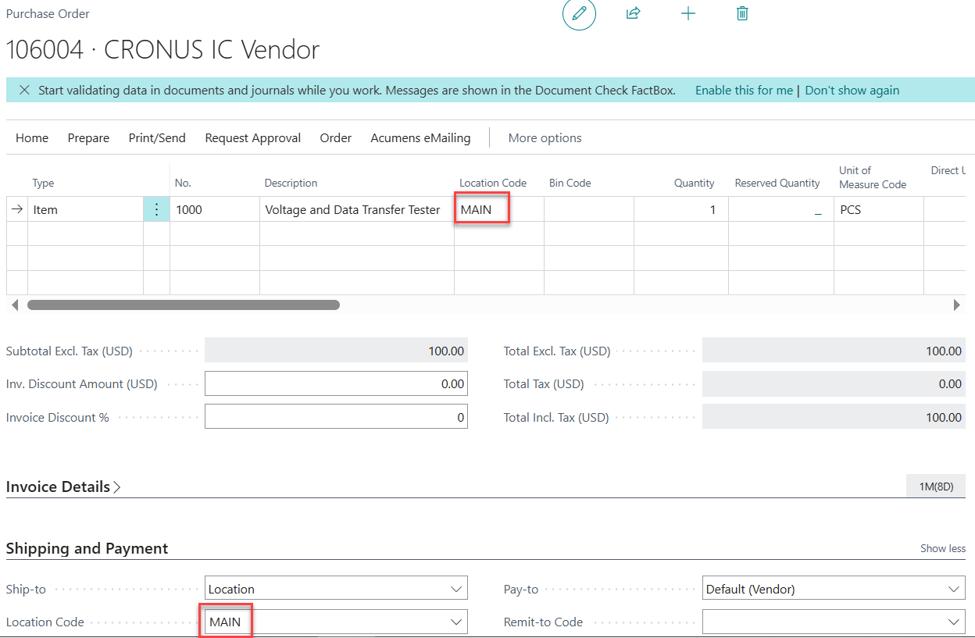
Handled outbox showing location codes
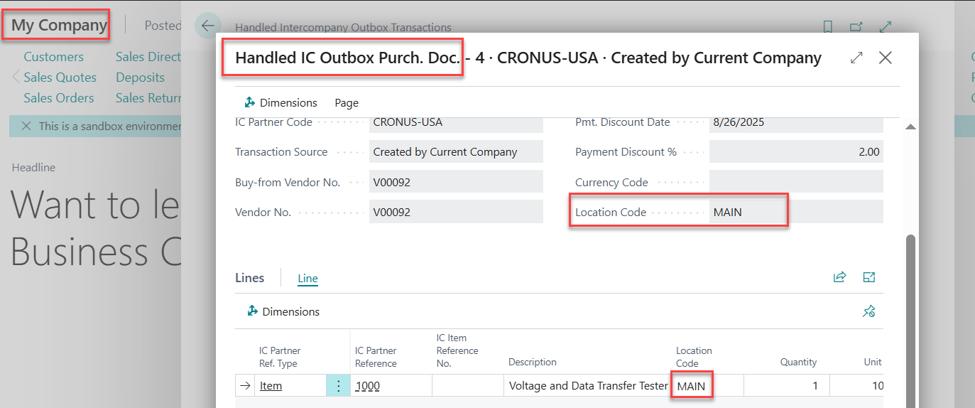
Handled inbox in the partner showing the Location codes
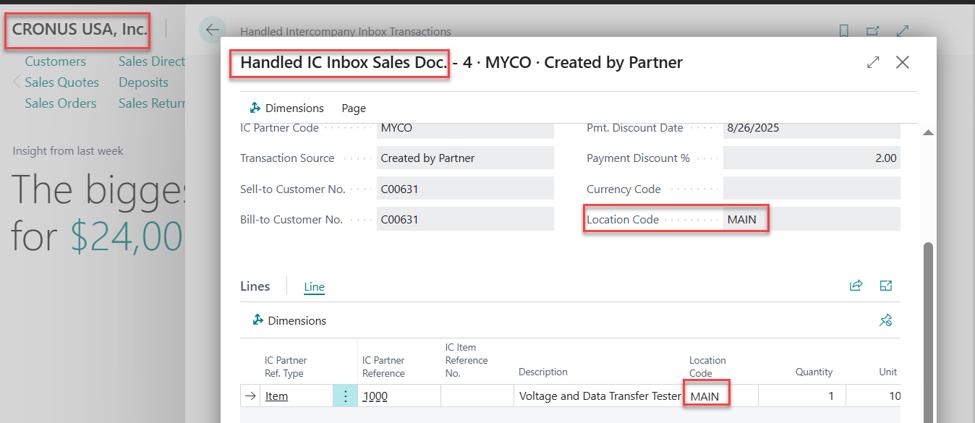
The resultant IC document in the partner has the locations.
IC Lot Transfer
Transfers lot tracking information alongside intercompany purchase and sales records, preserving traceability when goods move between companies.
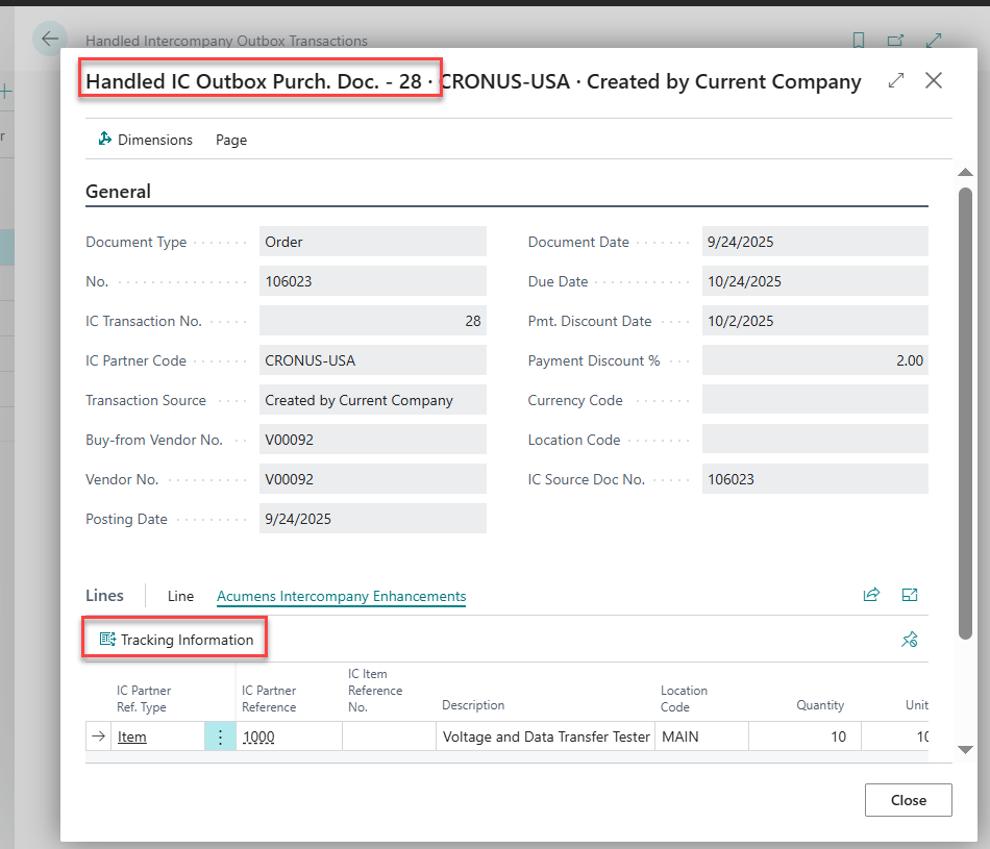
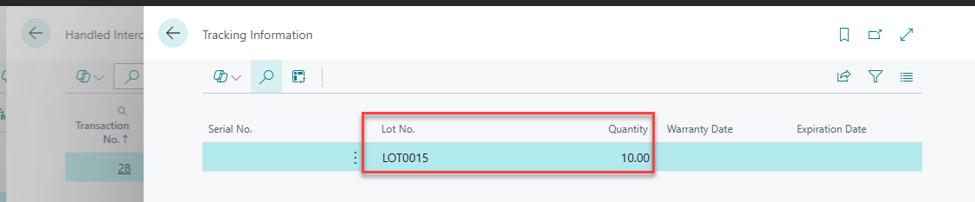
Create and post an IC document with tracking information. Handled intercompany outbox transactions with lot information transferred from the source document.
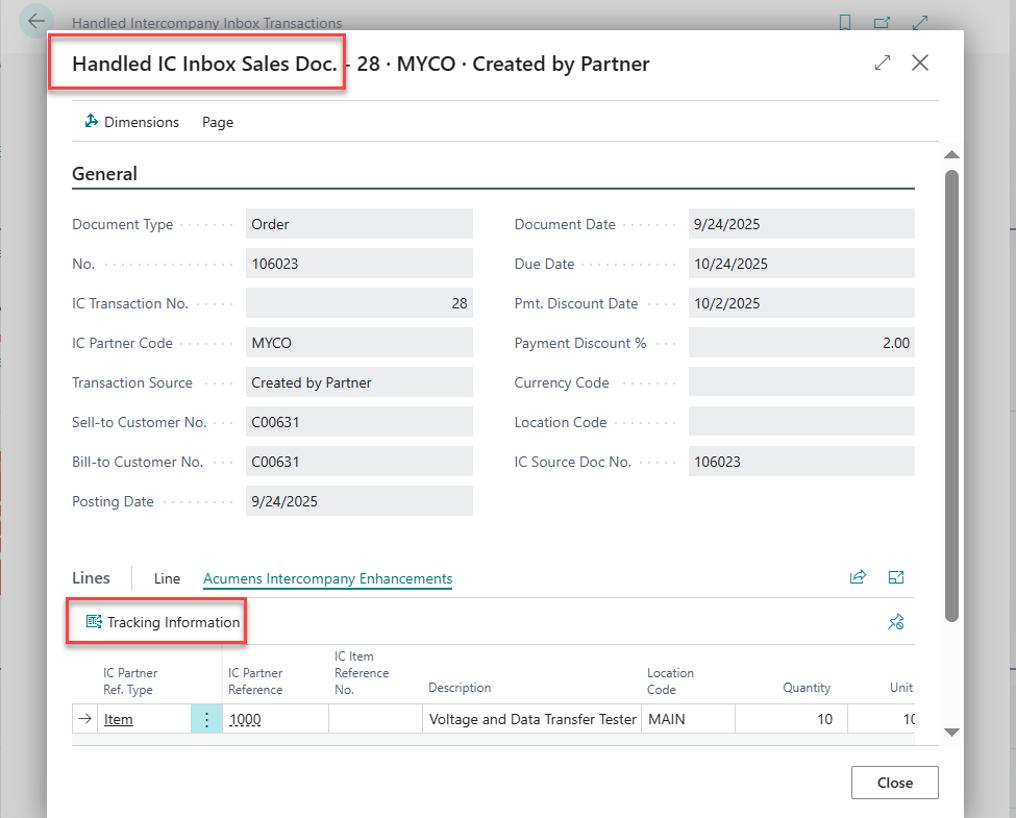
The handled intercompany inbox transaction in the receiving company with the same lot information, to be transferred to the resultant IC document in the partner.

IC Purchase Journals Processing
Automatically creates and posts intercompany journals from posted purchase invoices and credit memos and sends them to the designated IC partner — a capability not available in standard Intercompany functionality.
Create a purchase invoice then specify the destination partner in the “Acumens IC Partner Code” field and post the invoice.
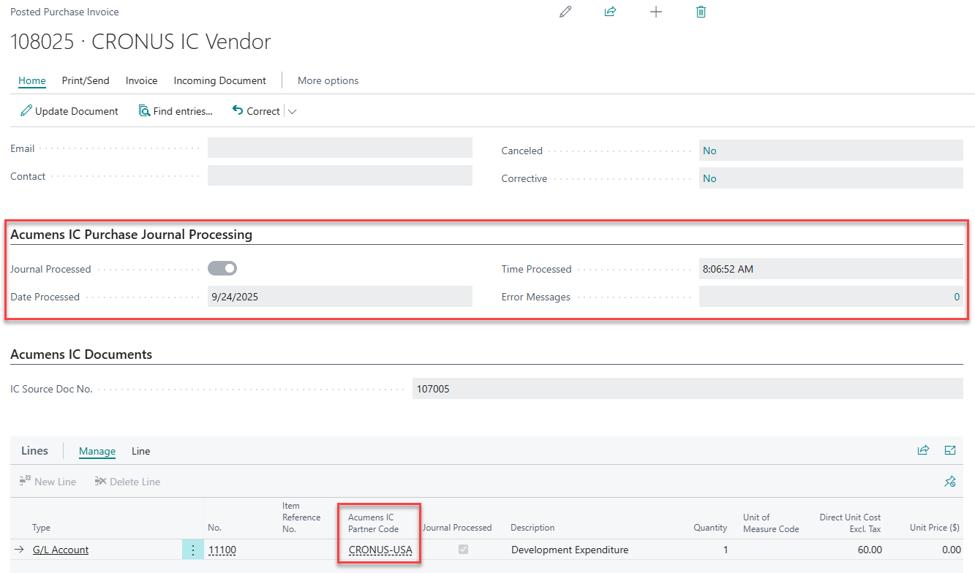
Batch process creates and posts intercompany journal entries from the posted purchase invoice.

IC Sales Order Processing
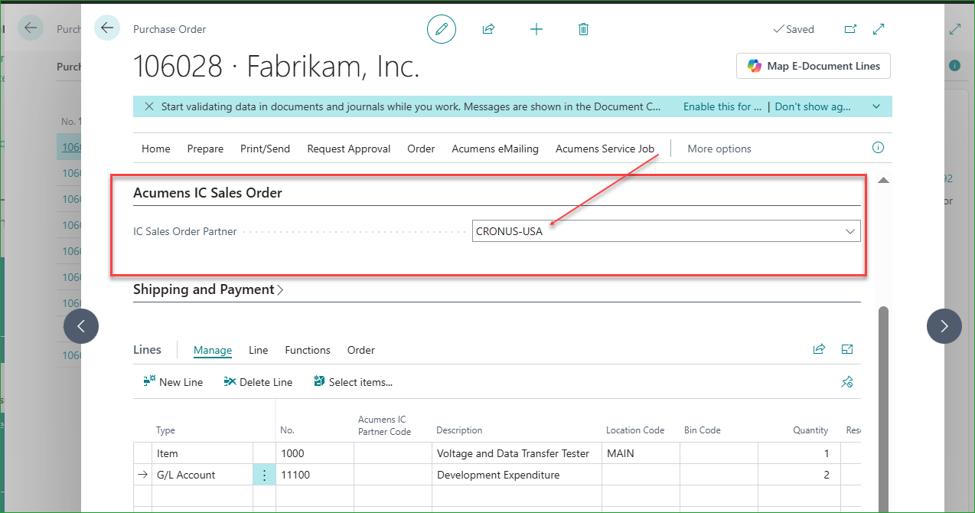
Lets you designate an intercompany partner — either when receiving a third-party purchase order or afterward via the IC Enhancements action — so the items and services are automatically sold to that partner through a generated and posted sales order.
Specify the target partner on the Purchase Order then post.
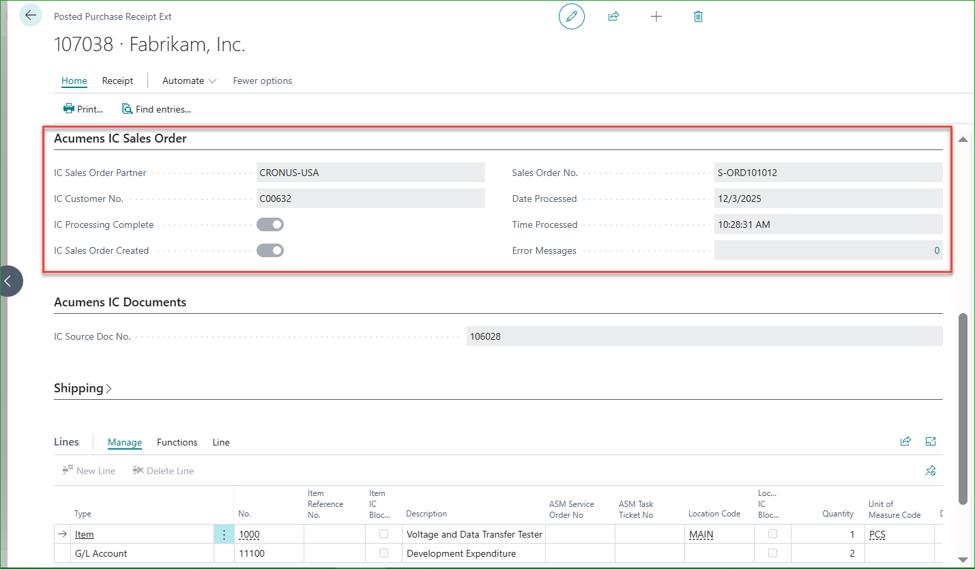
A batch process runs in the background to create and post ana IC Sales Order from the purchase receipt.
Incoming IC Documents Posting
Automatically posts accepted incoming intercompany transactions — purchase orders, purchase return orders, sales orders, and sales return orders — as soon as they're accepted, without manual posting.
An Incoming Purchase Order received but not posted.
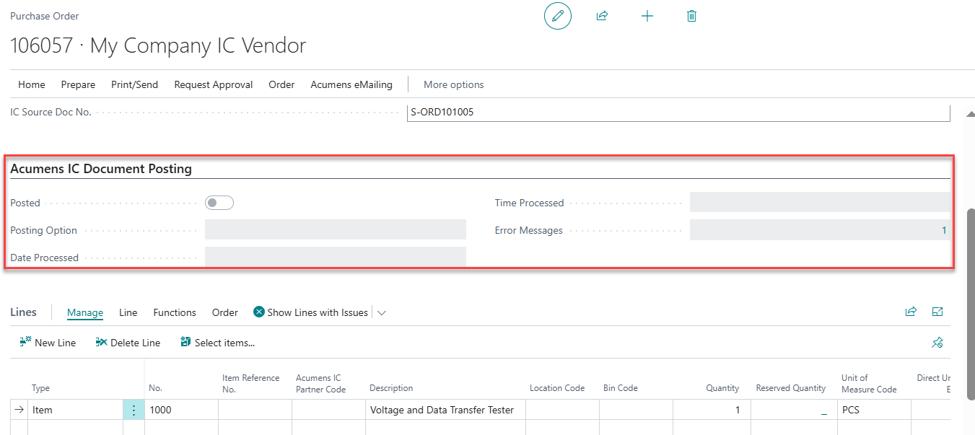
A batch process posts the document automatically.
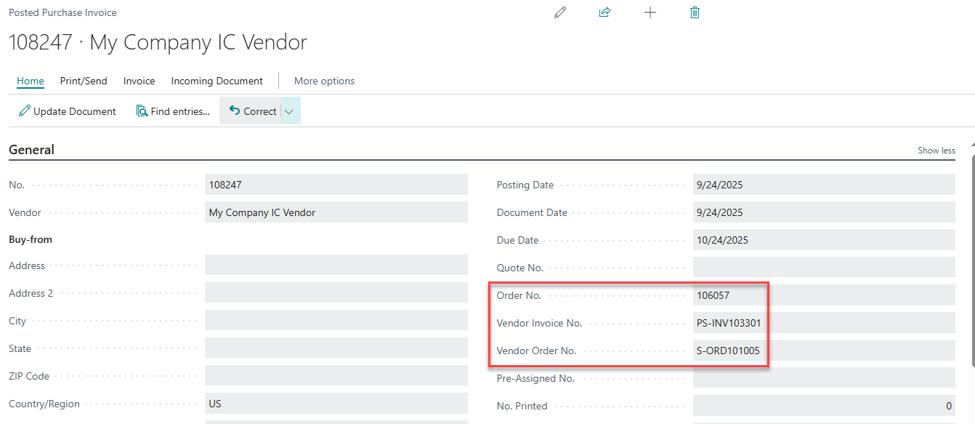
IC Documents Linkage
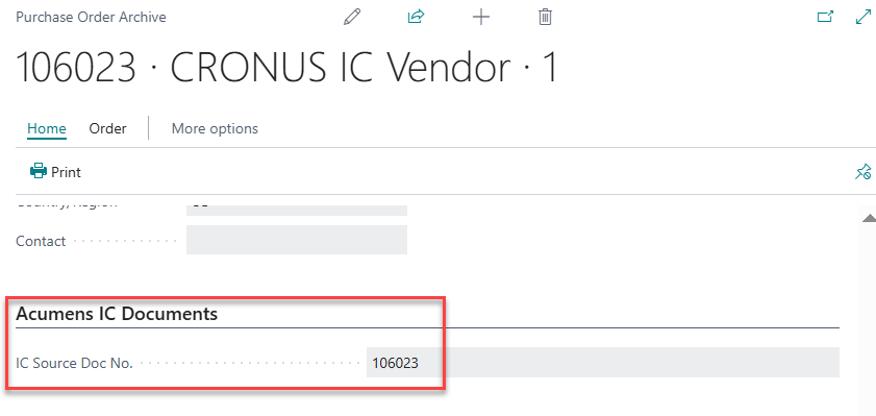
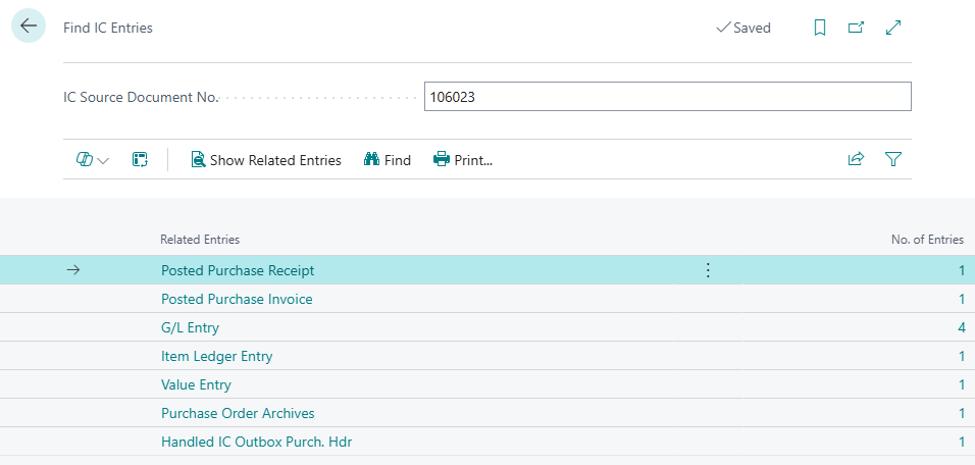
Adds an "IC Document No." field across all intercompany documents and a "Find IC Document" search function, making it easy to locate and review every transaction linked by that document number.
IC Document number from the source document is copied to all documents created by that IC transaction.
Use "Find IC" feature to Navigate to each related IC document.
Massive time savings – no more exporting/importing setup files, switching between companies, or manually posting IC transactions.
Consistency across companies – one source of truth for MDM configuration, replicated everywhere instantly.
Stronger data integrity – master data stays consistent; unsafe edits and deletions are blocked automatically.
Fewer sync failures – built-in repair tool catches and fixes broken couplings and failed records.
Complete contact data – contacts stay in sync across the organization; with support for all contact types.
End-to-end traceability – location, lot, and document linkage details follow transactions across companies.
Reduced manual IC processing – mapping, journals, sales orders, and incoming document posting all happen automatically.
Lower IT overhead – less manual reconfiguration and fewer cross-company support issues.
Multi-entity retail group: A retailer with five legal entities maintains a single product/vendor master in HQ and uses Copy Setup to roll out identical sync rules to all subsidiaries in minutes instead of days.
Post-acquisition integration: After acquiring a new subsidiary, the finance team uses Copy Setup and Synch. MDM Configs to onboard the new company into the existing MDM structure and repair any failed couplings during the transition.
Sales team with shared customer contacts: A holding company updates a customer's contact details once in the master company, and Contact Synch automatically pushes the update to every subsidiary that serves that customer.
Manufacturing group with shared chart of accounts: New G/L accounts added at HQ are automatically mapped across all subsidiaries via Automated IC Mapping, eliminating setup drift between entities.
Regulated inventory with lot tracking: A pharma distributor relies on IC Lot Transfer to preserve lot numbers when goods move between intercompany warehouses, supporting recall traceability.
Intercompany raw material sourcing for centralized processing: A subsidiary purchases raw materials from external vendors and uses IC Sales Order Processing to sell them to the main company, which receives and processes the materials for manufacturing or value addition.
Audit and dispute resolution: A finance team uses Find IC Document to pull up every linked document for a disputed intercompany invoice in seconds, rather than searching through different document types and trying to link between companies.
• Data governance enforcement: MDM Validation stops a subsidiary user from editing a shared vendor record locally, redirecting the change to the master company and keeping all entities in sync.
The Acumens IC Suite gives multi-company Business Central users a single, centralized, automated way to manage master data and intercompany processing — cutting manual work, enforcing data integrity, and keeping every entity in sync.