The Acumens Freight, Duties & Tariffs App is an extension for Dynamics 365 Business Central offering enhanced inventory cost calculation, landed cost management, item charge processing, and profit margin analysis. It enables businesses to calculate and allocate additional inventory costs like freight, import duty, and tariffs using configurable rules, ensuring accuracy, consistency, and compliance with national and regional tariff structures.
Contoso Resources Corp is a manufacturing and industrial products company that provides contract manufacturing, product design and development, sourcing, and supply chain support to businesses across multiple industries. The company is running the latest version of Business Central in the cloud.
This document details the company requirements & solution for automating landed cost calculation, freight charge assignment, tariff refunds and profit margin analysis. The documentation demonstrates how Acumens Freight, Duties & Tariffs is used as the solution to meet the requirements.
The company currently uses Lanham E-Ship to create Advance Shipping Notices (ASNs) for inbound containers. When an ASN is posted, the process creates Purchase Receipts and Purchase Invoices for the products and transfers the inventory to an "On the Water" location.
The company would like the Freight App to work alongside the existing Lanham E-Ship ASN process, enabling the calculation and allocation of freight, duties, tariffs, and other applicable inventory costs associated with inbound containers.
Posting a container ASN in Lanham E-Ship creates standard Purchase Receipts in Microsoft Dynamics 365 Business Central. The Freight App processes inventory costs associated with these Purchase Receipts, allowing the relevant freight, duties, tariffs, and other applicable charges to be calculated and allocated. Consequently, the app supports the existing ASN workflow without requiring a direct integration with Lanham E-Ship.
The company would like to integrate with a customs EDI provider via an API to retrieve customs invoice data and automatically create corresponding Purchase Invoices in Microsoft Dynamics 365 Business Central.
The Acumens Freight, Duties & Tariffs App does not currently include a built-in integration with customs EDI service providers. However, this integration can be implemented separately on an as-needed basis.
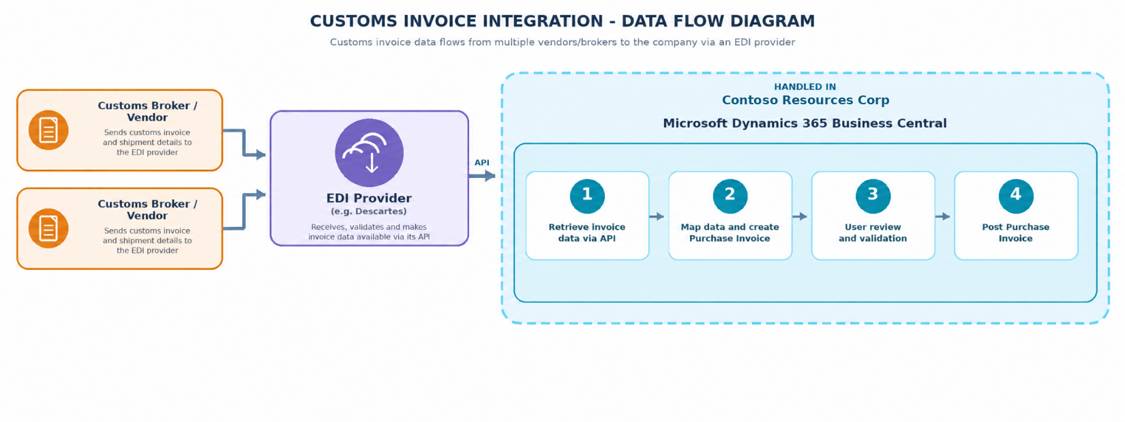
Contoso Resources Corp would engage an external customs EDI provider and arrange for its vendors to submit customs invoice data through the provider. Business Central would then be integrated with the EDI provider via an API to retrieve the invoice data and automatically create corresponding Purchase Invoices.
The integration would handle mapping the relevant invoice details, including vendor information, invoice references, shipment details, customs duties, freight charges, and other applicable inventory costs. The generated Purchase Invoices would then be matched with the relevant Purchase Receipts, reviewed, and posted in Business Central.
The company's products may be subject to multiple tariff components under a single HTS code, including different tariff programs such as Sections 232 and 301. The company needs to identify and account for each applicable tariff component and its corresponding rate to ensure accurate calculation of total duties and tariffs.
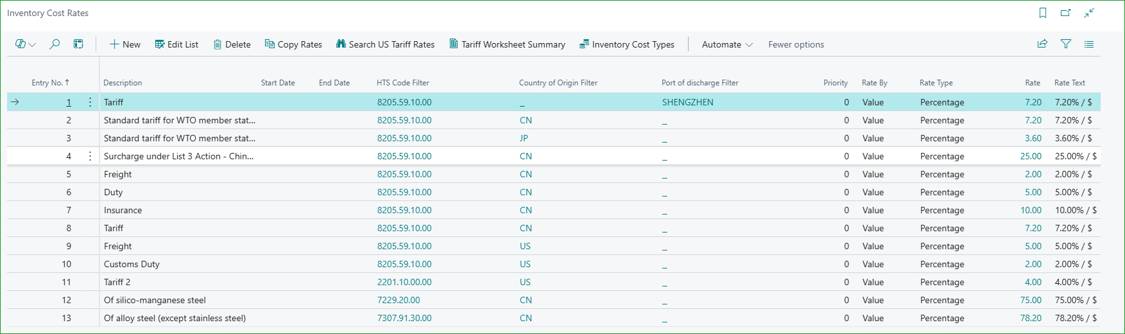
The Acumens Freight, Duties & Tariffs App supports defining inventory cost rates for individual tariff components, allowing multiple components under the same HTS code to be maintained separately. The Tariff Worksheet retrieves and analyses tariff information from the integrated API, allowing users to review and implement individual tariff components, rather than a consolidated rate, into the Inventory Cost Rates table. Each component is then available for separate tariff calculation and allocation.
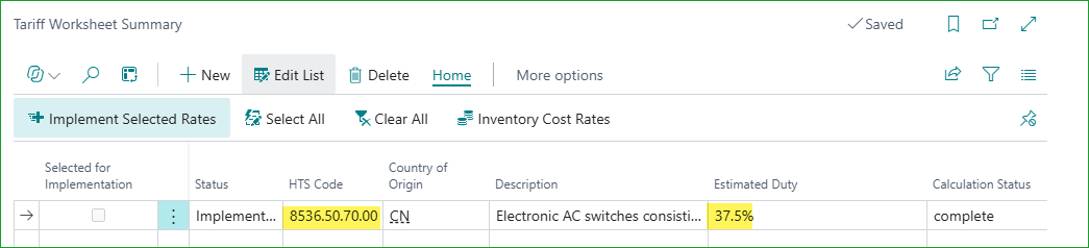
The aggregated tariff rate for HTS 8536.50.70.00.
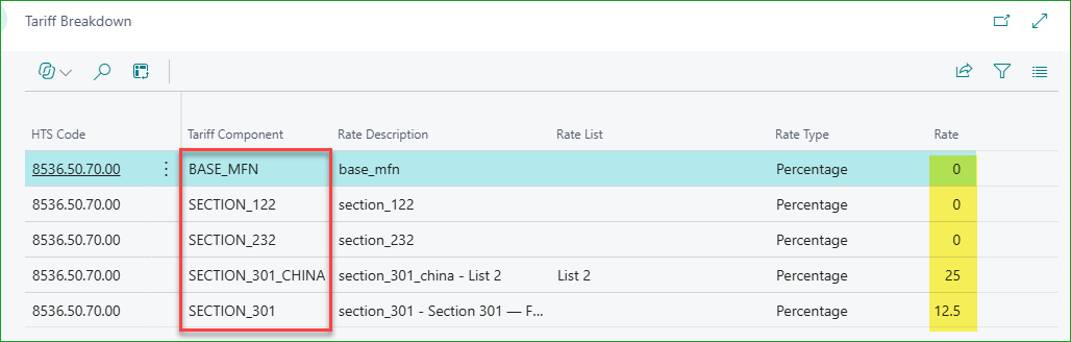
The components.
Rate setup created for the components with rate values.

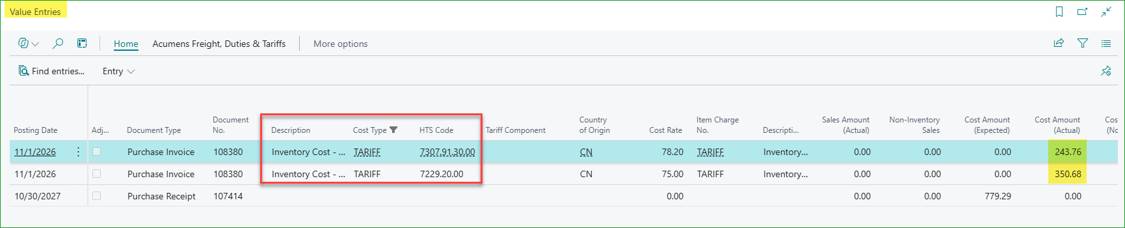
Tariff components posted to the Value Entries.

The company purchases products with varying Countries of Origin (COO). The same item may be sourced from multiple vendors in different countries, and a single vendor may ship products originating from different countries. Therefore, the Country of Origin needs to be specified based on the actual origin of the products received rather than relying solely on the vendor's location.
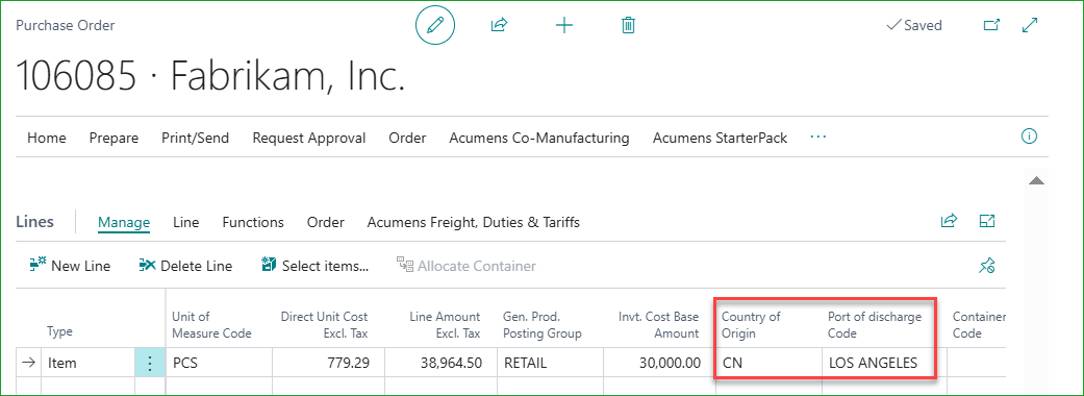
The Acumens Freight, Duties & Tariffs App allows the Country of Origin (COO) to be specified directly on Purchase Order lines, enabling inventory costs and applicable tariffs to be calculated based on the actual origin of the products being purchased. Other inventory cost valuation factors are also specified on the lines for accurate valuation.
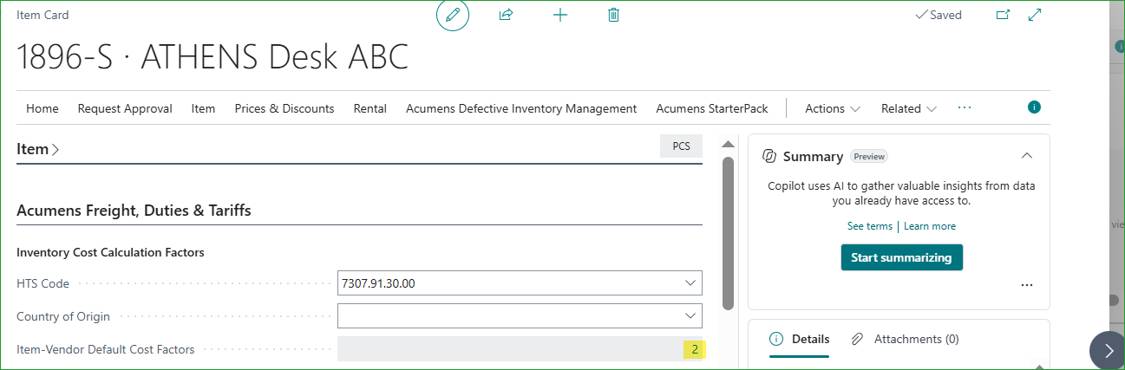
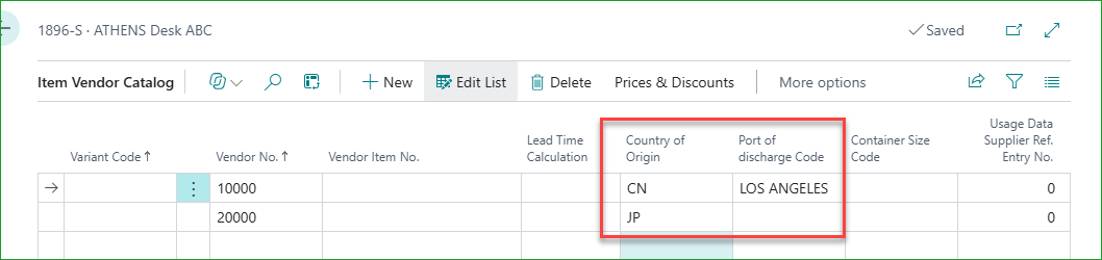
The default country of origin can be defined per item-vendor and then automatically updated when Purchase Lines are created.
In some cases, the company qualifies for the First Sale Rule, under which the value used to calculate customs duties and tariffs may differ from the price paid to the vendor. The company needs to account for these differences to ensure that applicable tariffs are calculated using the appropriate customs value rather than automatically using the vendor purchase price.
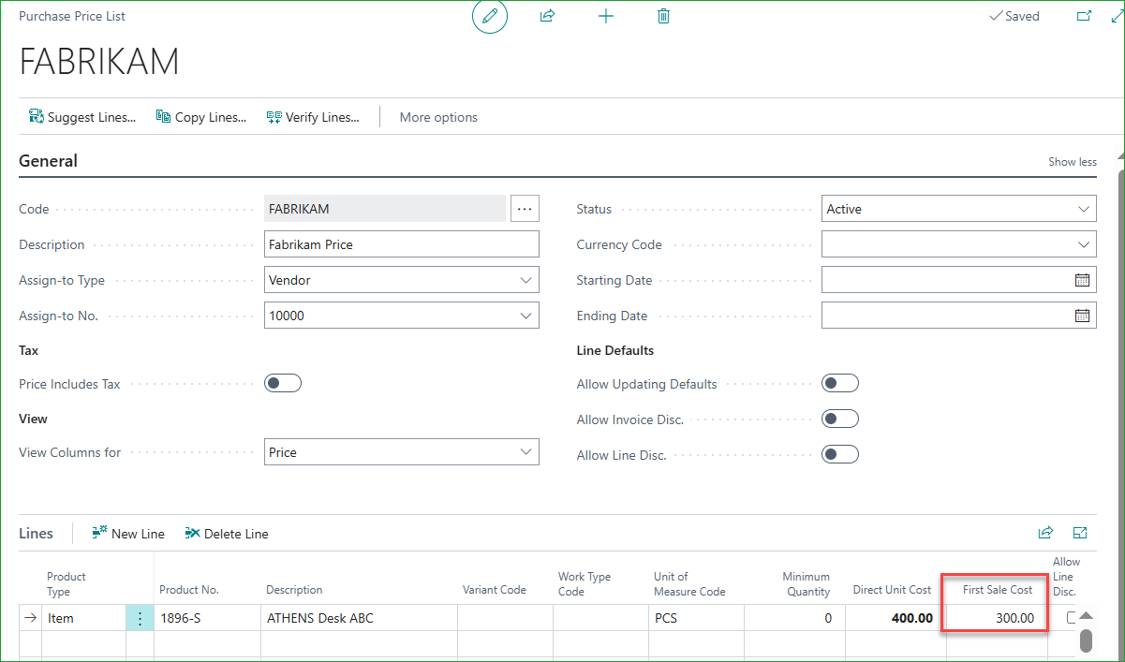
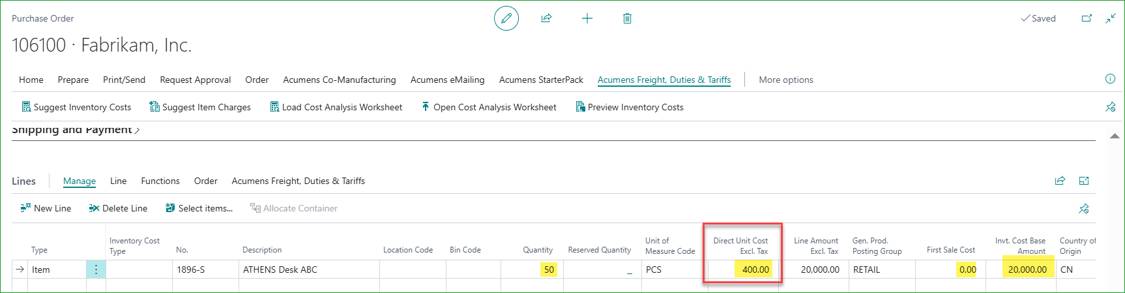
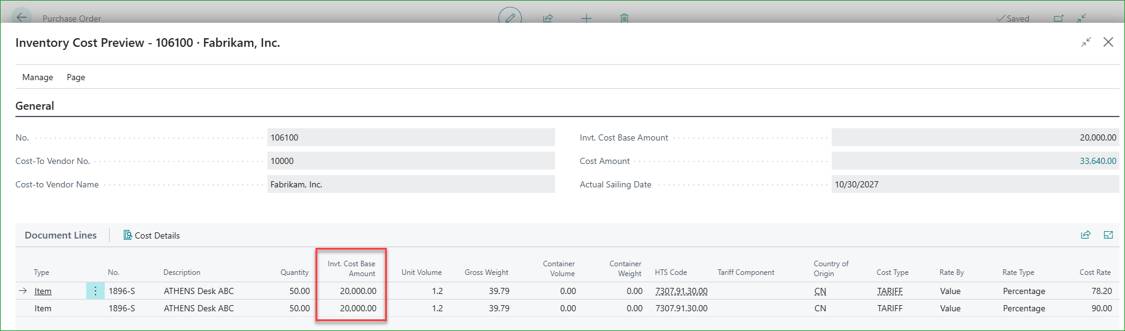
The Acumens Freight, Duties & Tariffs App introduces a First Sale Cost field that users can modify to specify the customs valuation amount used as the basis for calculating applicable inventory costs and tariffs. When the First Sale Cost is zero, the app uses the Direct Unit Cost instead. This allows the company to apply the appropriate customs valuation where the First Sale Rule applies.
The value can be set in Purchase Price lists then copied to the Purchase Line.
The value on a Purchase Order – user can change the value as desired.
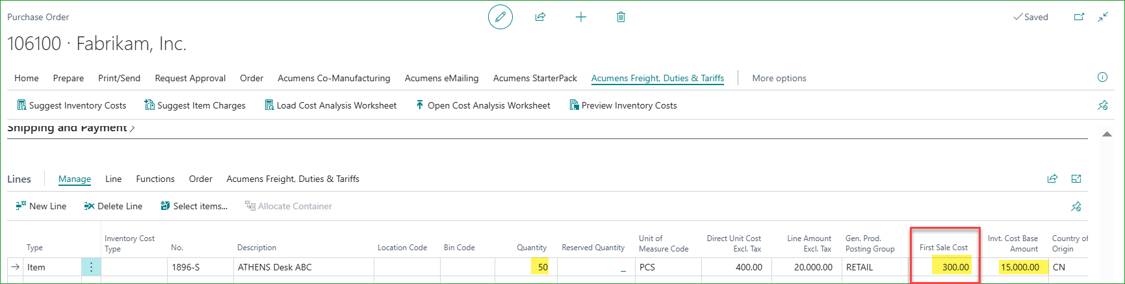
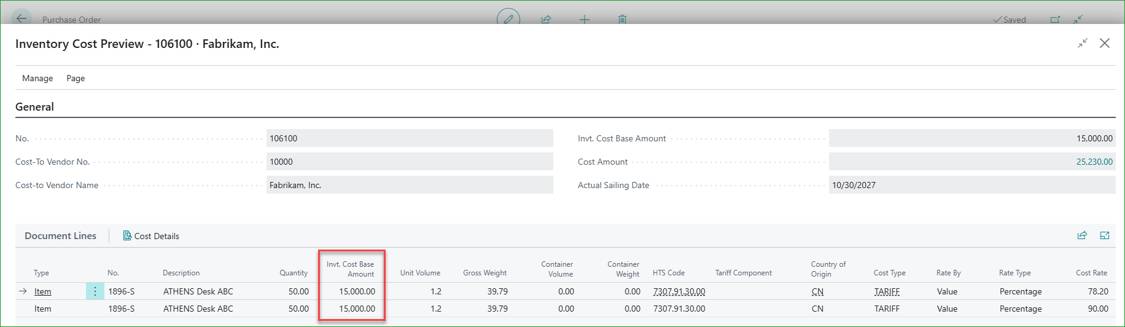
If the “First Sale Cost” is 0, then direct unit cost is used.
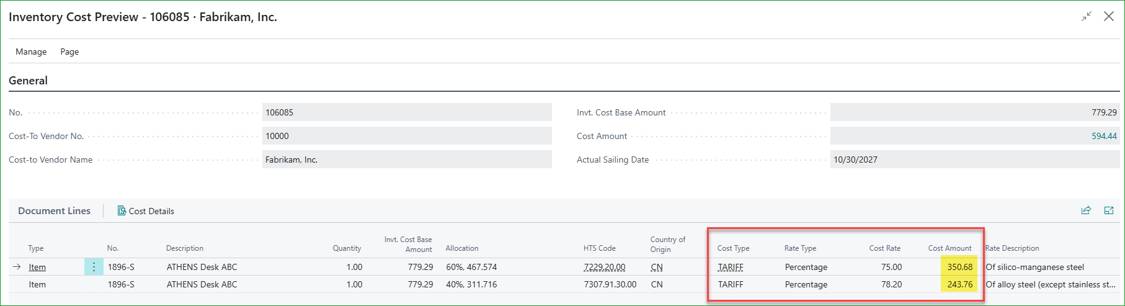
The company wants to automate the calculation and allocation of duties and tariffs to item costs based on HTS codes and applicable rates, reducing manual processing of customs invoices. Each tariff type should be separately identifiable in Value Entries, with charges allocated to the relevant inventory costs.
The Acumens Freight, Duties & Tariffs App provides setup tables for defining inventory cost types and applicable rates. These costs are calculated and accrued automatically during receipting, reducing manual processing and ensuring consistent allocation of inventory costs.
The company wants to simplify inbound freight cost allocation on Purchase Invoices by automating the calculation of applicable freight charges and their assignment to the relevant purchase lines.
The Acumens Freight, Duties & Tariffs App provides setup tables for defining contracted freight rates as fixed amounts per container, based on applicable criteria such as container size and other configured parameters. The distribution method determines whether the freight charge is allocated based on volume or weight.
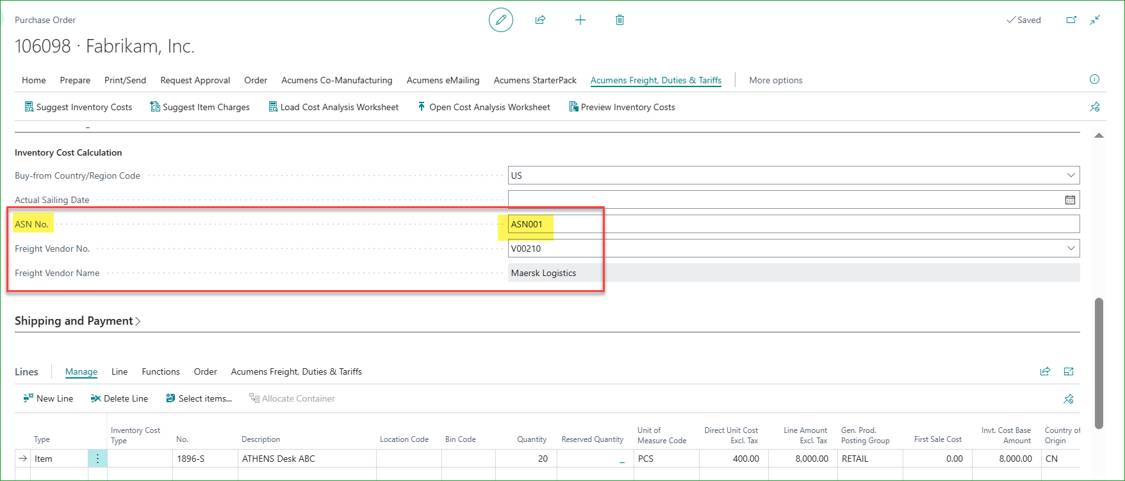
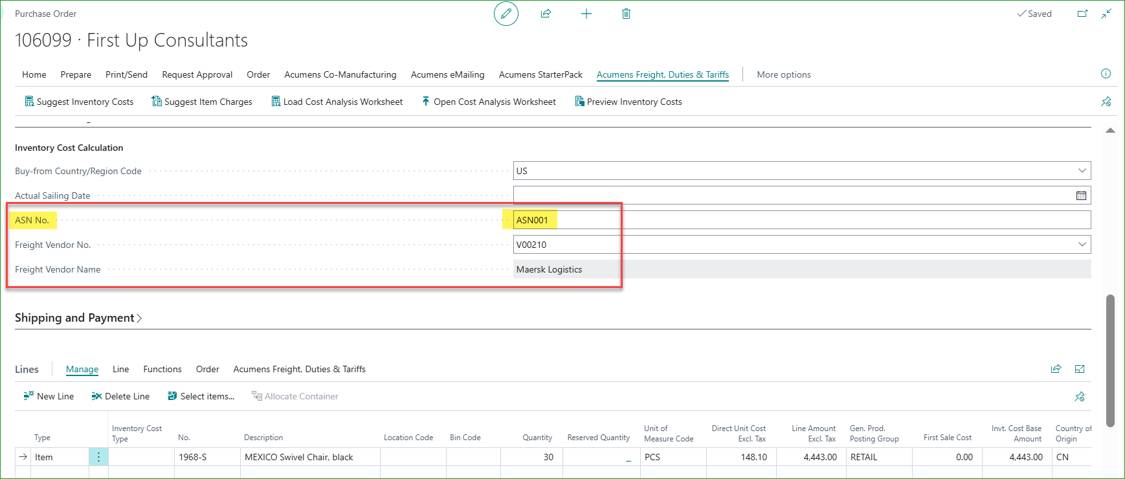
When Purchase Receipts are posted, the app identifies all orders associated with the container through the assigned ASN number and calculates the total volume or weight of the items received under that ASN. It then distributes the contracted container freight amount across the relevant items in proportion to their respective volume or weight. The calculated freight costs are automatically accrued and allocated to the corresponding inventory, ensuring that the full contracted container charge is distributed across all associated orders.
Contracted rate set at $5,000 per container to be distributed by volume. This rate applies to Freight Service Provider V00210.

Two orders from the same container: Orders 106098 and 106099 from container ASN001 and Freight Vendor V00210.
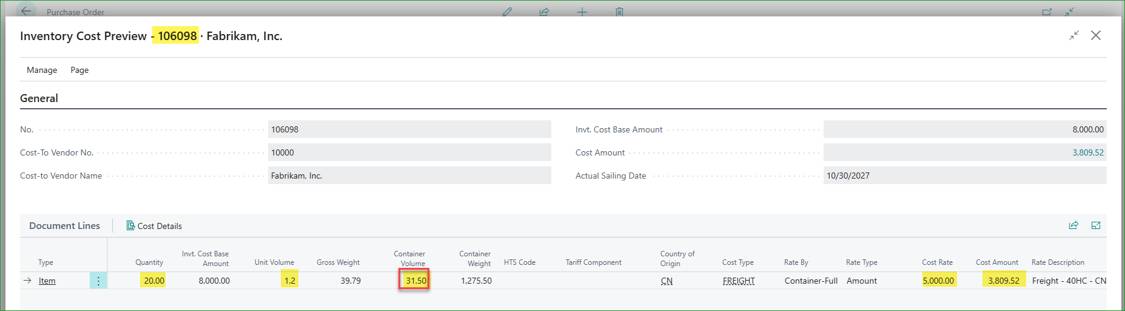
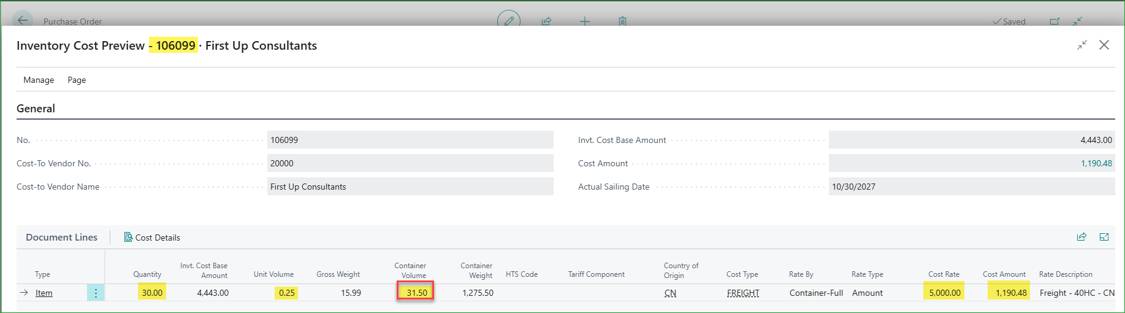
Freight accruals preview, showing the freight charge distributed by volume to the orders.
Order 106098: Volume => 20 * 1.2 = 24.
Order 106099: Volume => 30 * 0.25 = 7.5.
Total Volume (Container) = 31.5.
106098 Freight Cost => 24/31.5 * $5,000 = $3,809.52.
106099 Freight Cost => 7.5/31.5 * $5,000 = $1,190.48.
Same contracted rate set at $5,000 per container to be distributed by weight. This rate applies to Freight Service Provider V00210.

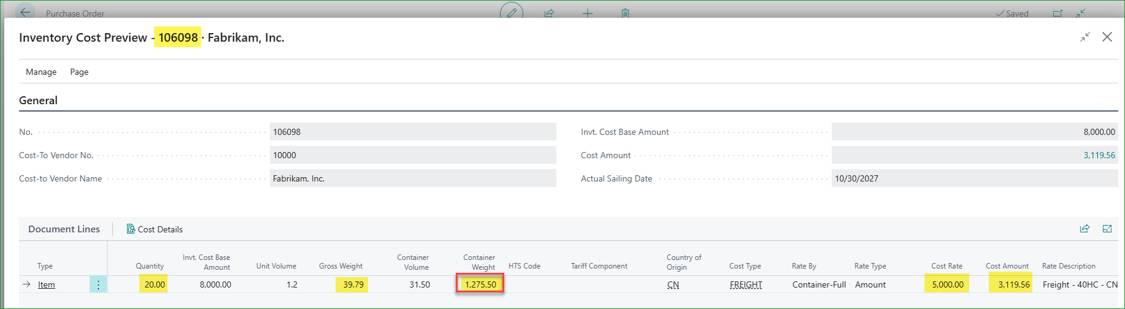
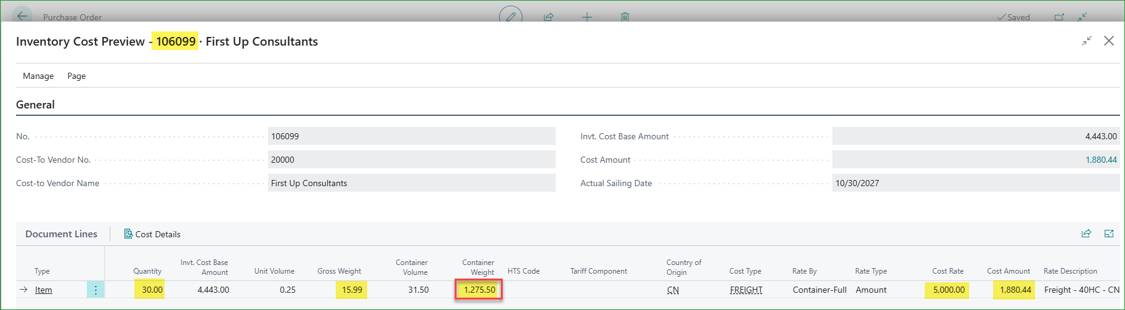
Freight accruals preview, showing the freight charge distributed by weight to the orders.
Order 106098: Weight => 20 * 39.79 = 795.8.
Order 106099: Volume => 30 * 15.99 = 479.7.
Total Weight (Container) = 1,275.5.
106098 Freight Cost => 795.8/1275.5 * $5,000 = $3,119.56.
106099 Freight Cost => 479.7/1275.5 * $5,000 = $1,180.44.
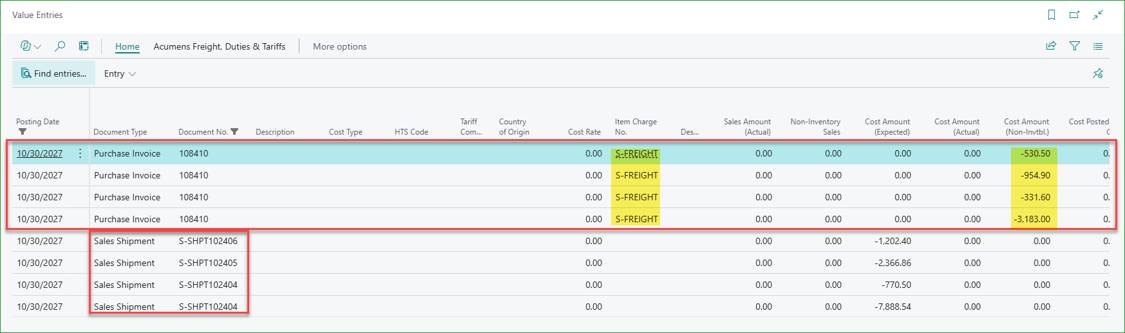
Accrual posted to Value Entries

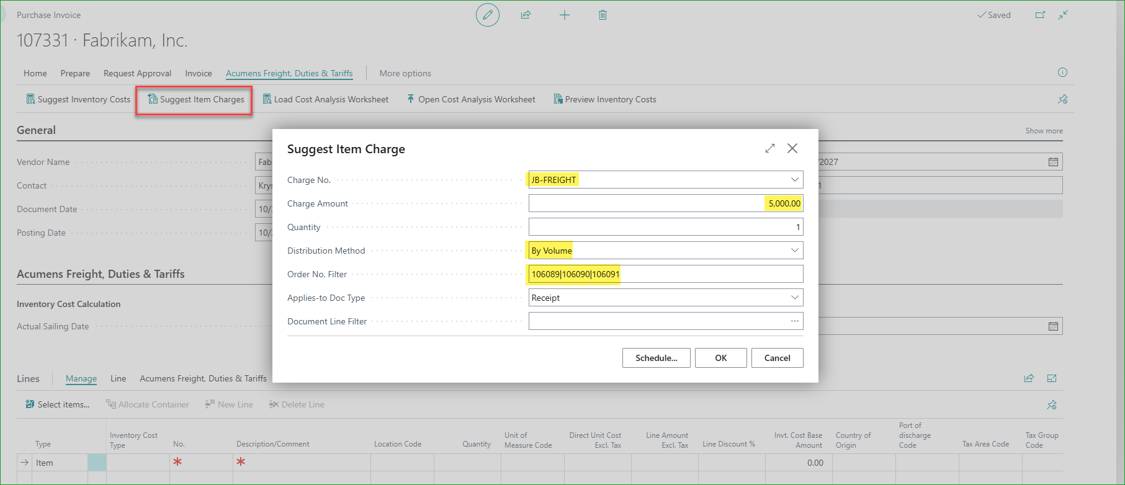
The Acumens Freight, Duties & Tariffs App provides the Suggest Item Charge action. Users select the relevant Item Charge, enter the contracted freight rate as the charge amount, and specify the Purchase Order numbers associated with the freight invoice. The app automatically creates the corresponding Purchase Invoice line and Item Charge Assignment lines for all Purchase Receipts linked to the specified orders.
Example: Orders 106089, 106090 and 106091 have the same ASN – received from the same container. The agreed freight charge for the container is $5,000 to be distributed by volume.
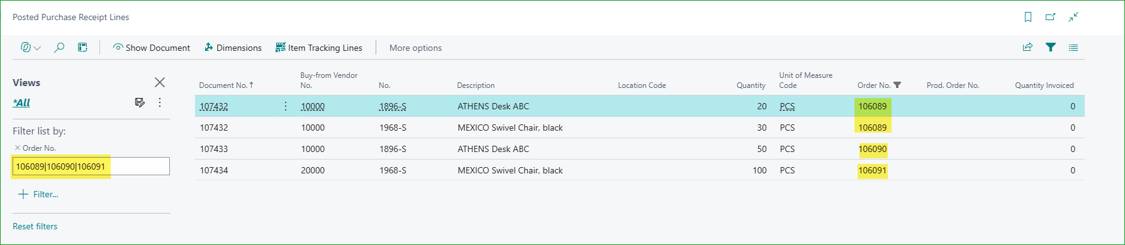
Suggest Item Charge – specify the freight item charge, enter the amount, select the distribution method and enter the order number filters.
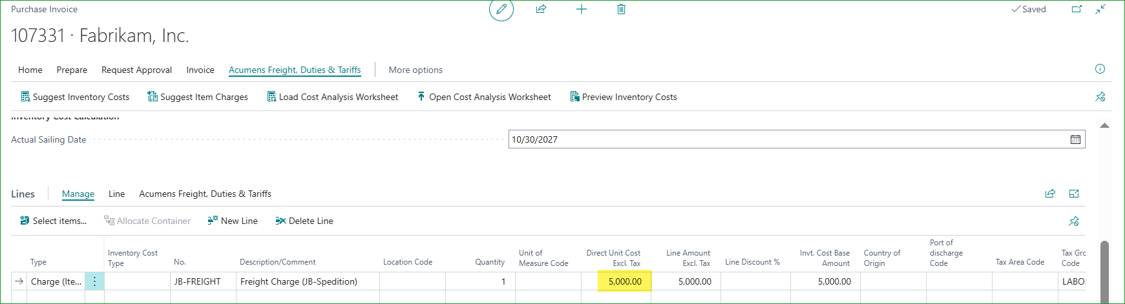
Purchase invoice line created/updated, costs calculated, and item charge assignment lines created and charges distributed automatically.
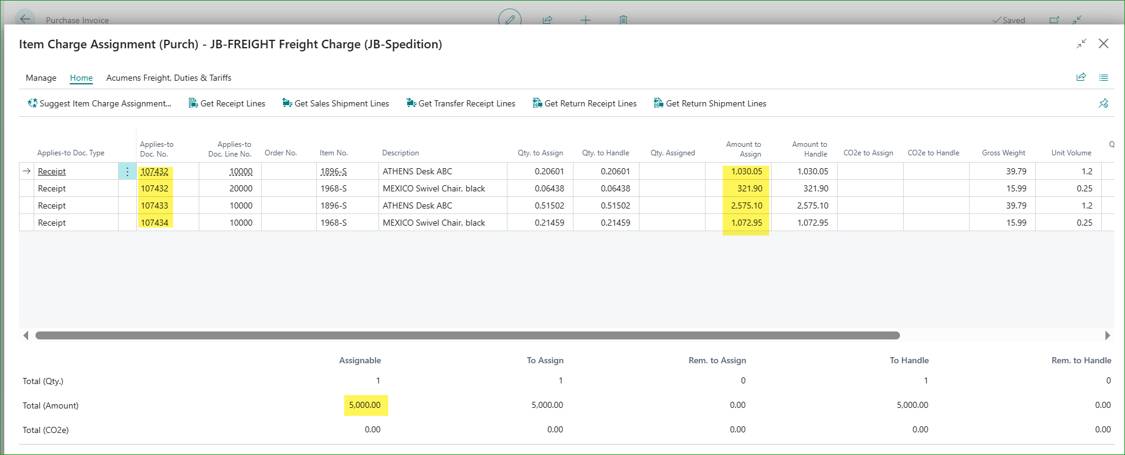
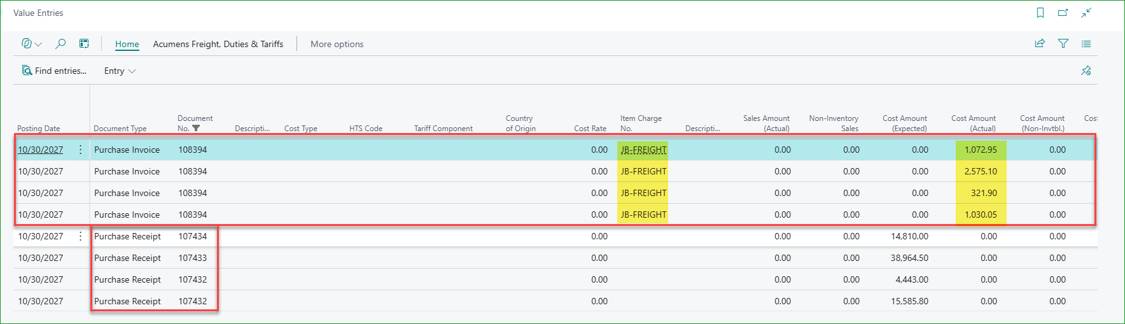
When invoice is posted, freight charges allocated to the receipts.
The company would like to access reliable customs tariff information and HTS classification data to support product classification and accurate tariff calculations.
The Acumens Freight, Duties & Tariffs App integrates with external tariff APIs that provide HTS classification and tariff lookup services, enabling users to retrieve relevant classification and tariff information for inventory cost calculations.The app supports multiple APIs – with one selected as the default.
| API | Status | Provider URL |
| US Tariff Rates | Implemented | https://www.ustariffrates.com/ |
| TariffLens | Under Development | https://www.tarifflens.ai/ |
| BITE | Under Development | https://bitedata.io/ |
| KYG Trade | Under Development | https://www.kygtrade.com/ |
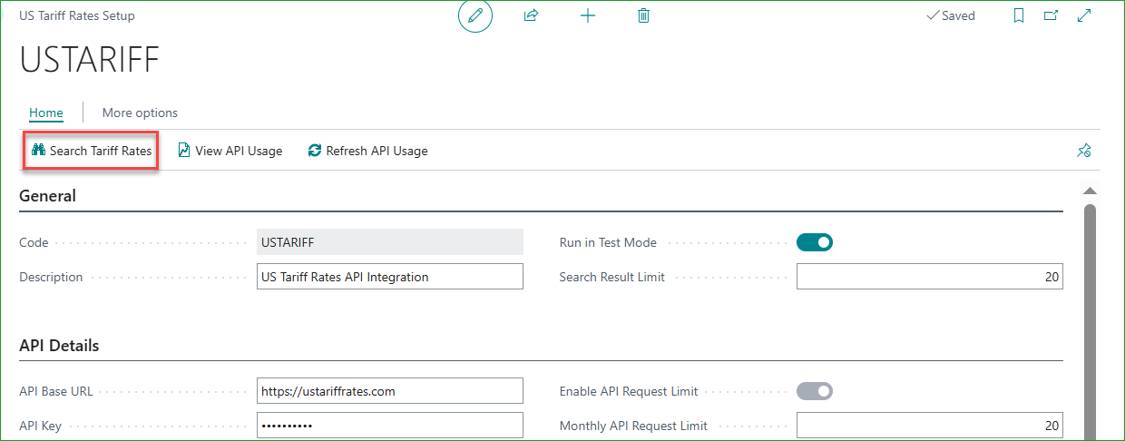
Test with US Tariff Rates API.
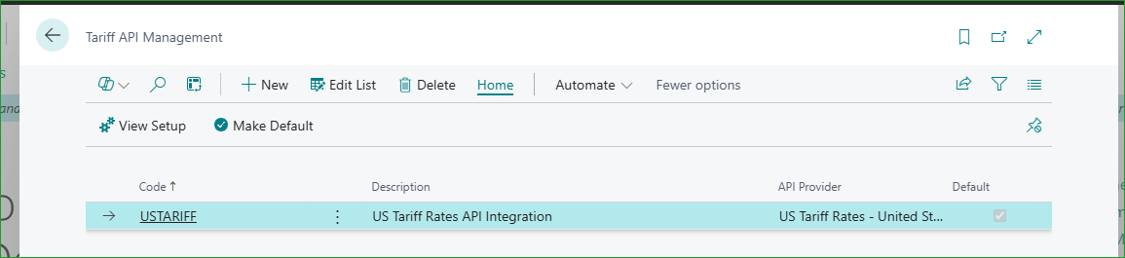
Search for rates per country of origin using either tariff description or HTS code. The API looks up and loads all applicable HTS codes and their tariff rates.
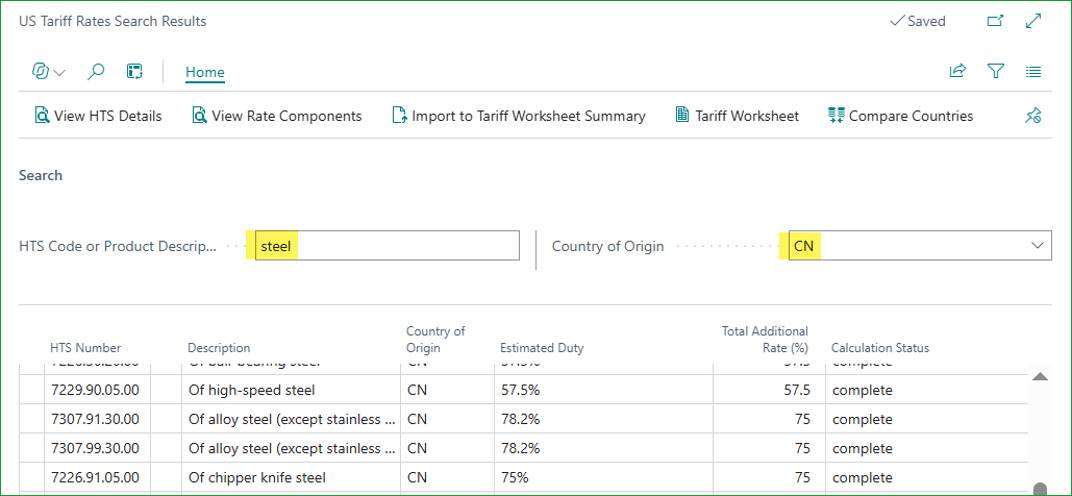
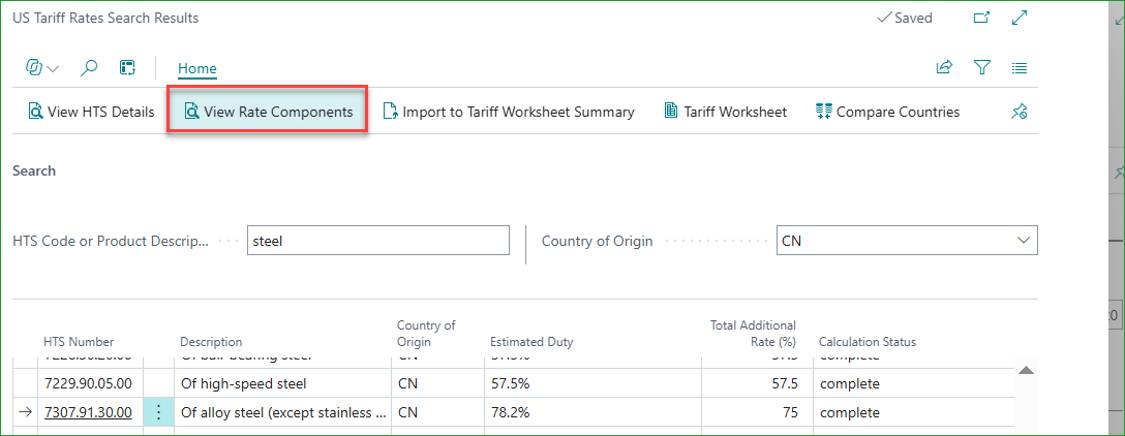
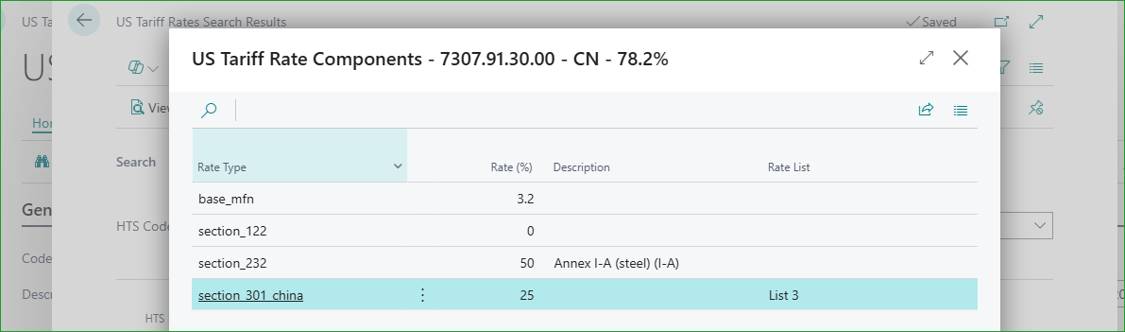
View a breakdown of rate components for any selected entry.
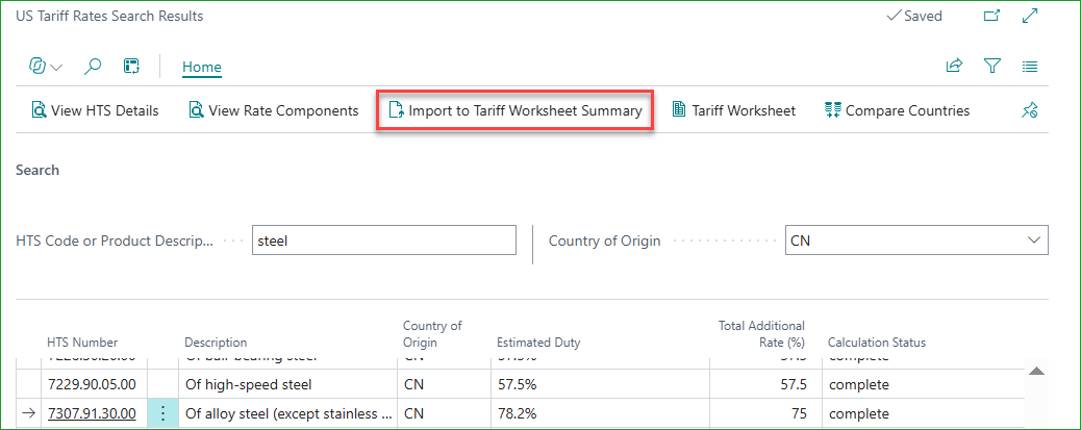
Import selected tariffs to a worksheet for further review before implementation. The worksheet step can be skipped using automation to load these rates to the inventory cost rates table.
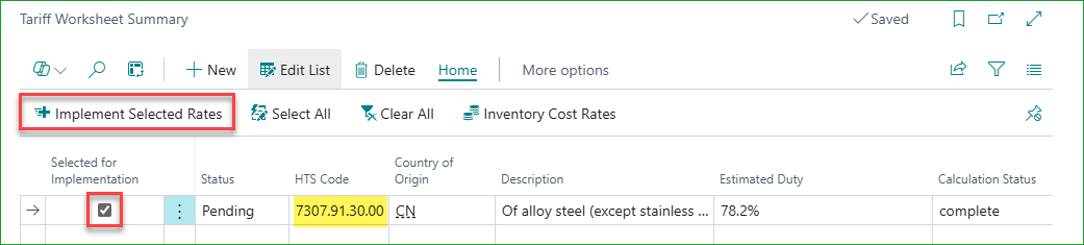
After review in the worksheet, select the rates to implement to the Inventory Cost Rates table for use.

The company uses actual costing, where the item’s unit cost reflects the average cost of inventory on hand. Inventory in transit can distort this cost because freight, customs duties, and other charges may not yet have been invoiced or assigned. The company would like to estimate these costs using available HTS codes, Countries of Origin, duty and tariff rates, and freight rates.
The Acumens Freight, Duties & Tariffs App supports automatic accrual of estimated inventory costs when Purchase Receipts are posted. Actual invoices can be posted later, allowing the accrued costs to be reconciled against the actual charges.
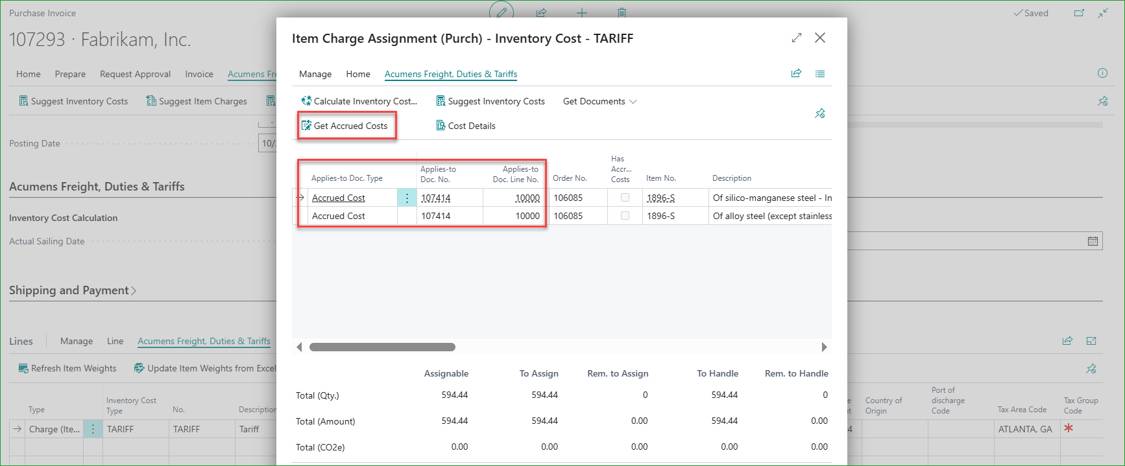
Accrued costs were automatically calculated, assigned, and posted when receipt 107414 was posted.

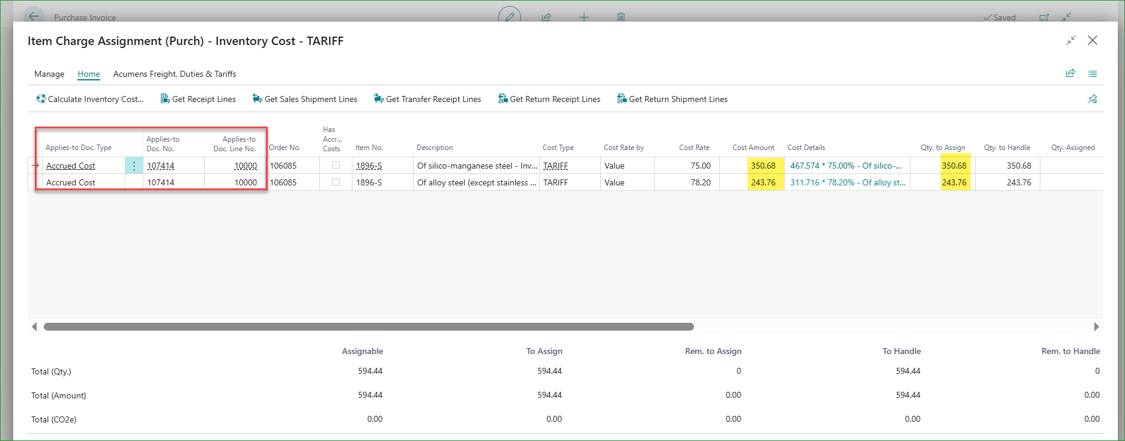
Later, when the customs invoice is received from the vendor, create the purchase invoice in Business Central, then load the related accrued costs and add any additional charges from the vendor. Posting the invoice reconciles the inventory costs.
Cost amounts pulled from value entries as calculated during accrual.
The app provides Standard Cost feature for Wholesale Distributors that calculates the total landed cost of items by incorporating the item unit cost/vendor purchase price and the applicable freight, duties, tariffs, and other inventory costs based on configured rates. Users can evaluate the calculated costs by region, select the appropriate cost, and implement the updated standard cost on the Item Card, followed by inventory revaluation where applicable.
Item 1896-S STD with unit cost $790.
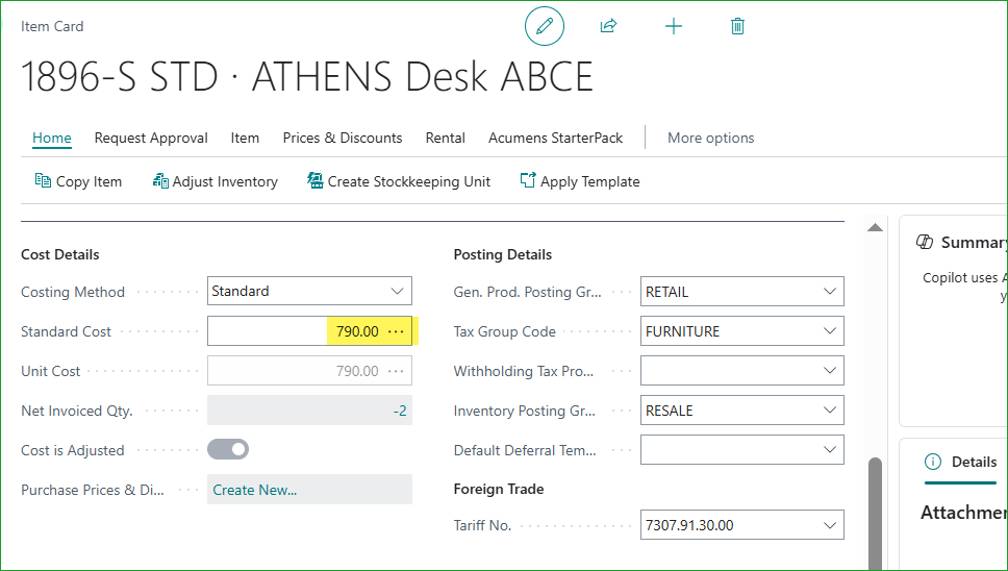
1 unit received at the cost of $790.

Load item into analysis worksheet, automatically calculating other inventory costs.
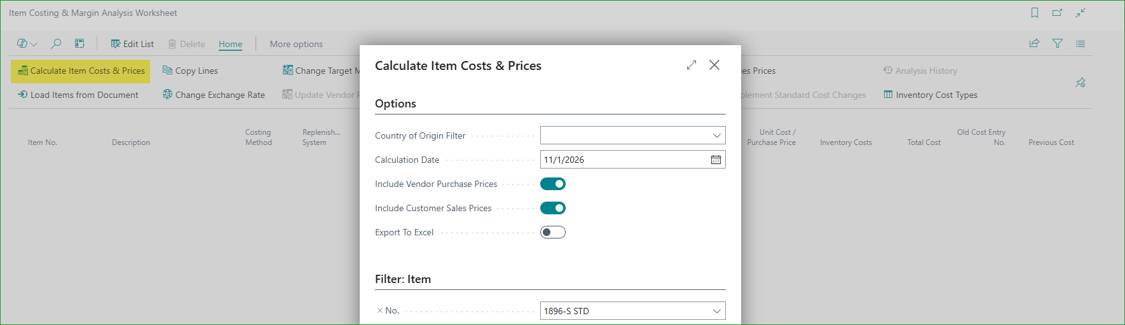
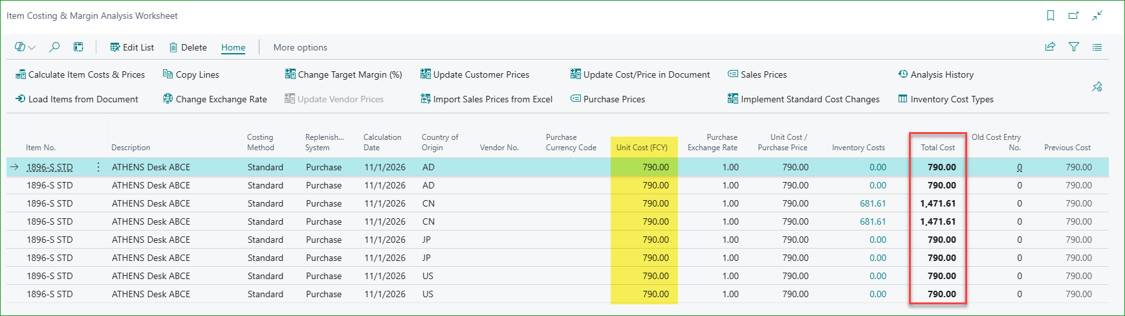
Current cost of 790 and new calculated cost – Total Cost.
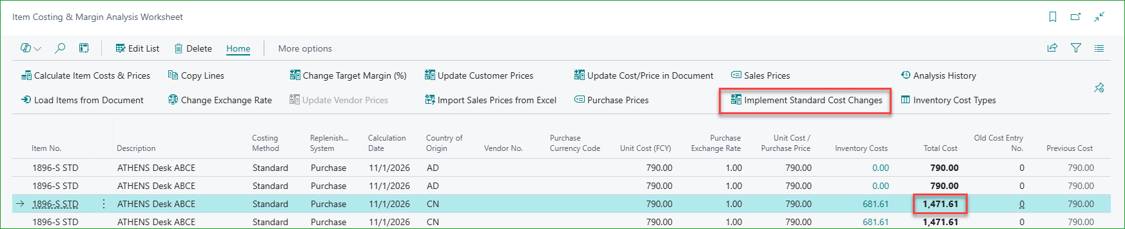
Implement the Standard Cost Changes. Cost changes from 790 to 1,471.61.
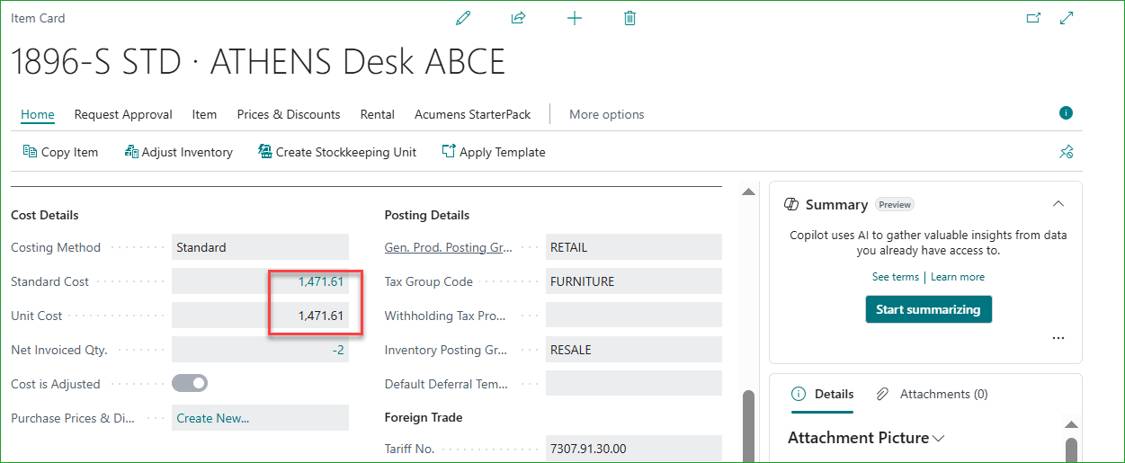
The action updates item card.
A revaluation journal is also created, to be posted manually.
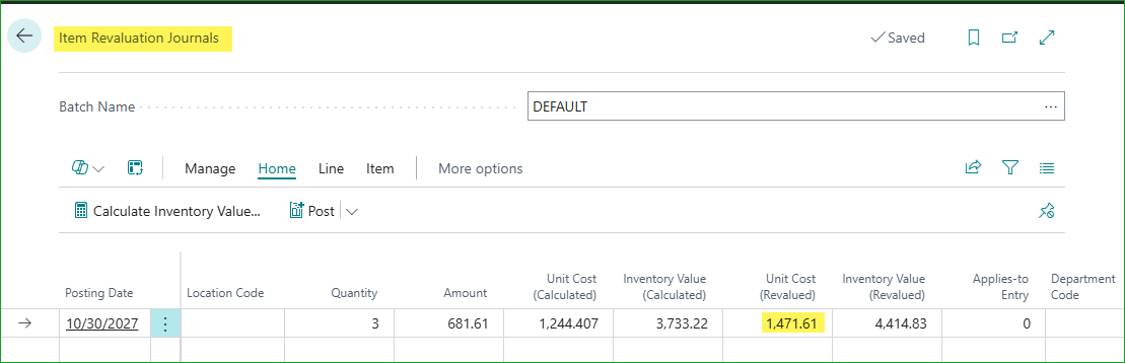
Revaluation entries created after posting of the revaluation journal, updating costs to match the prevailing rates.


The company wants historical reporting of duties and tariffs by Country of Origin (COO), HTS code, duty or tariff type, vendor, and ASN or Purchase Receipt. Reports should support analysis by shipment date, customs invoice posting date, and inventory held as of a specified date.
The Acumens Freight, Duties & Tariffs App provides an Inventory Cost Value Entries page that displays inventory cost entries and their associated details and dates. Users can apply filters to analyze historical duty, tariff, and other inventory cost transactions based on the available entry information.

The company wants to calculate landed costs for items being quoted, using existing or future duty, tariff, and other inventory cost information. The solution should support processing large quotes containing hundreds of items, with the ability to apply formulas and analyze costs efficiently using a worksheet or spreadsheet.
The Acumens Freight, Duties & Tariffs App provides a Costing and Price Margin Analysis worksheet that allows users to load items from a document, such as a sales quote, and automatically calculate their landed costs. Users can adjust the calculated costs, analyze pricing margins, and update the resulting costs and prices directly on the source document.
Price on Sales Quote Line.
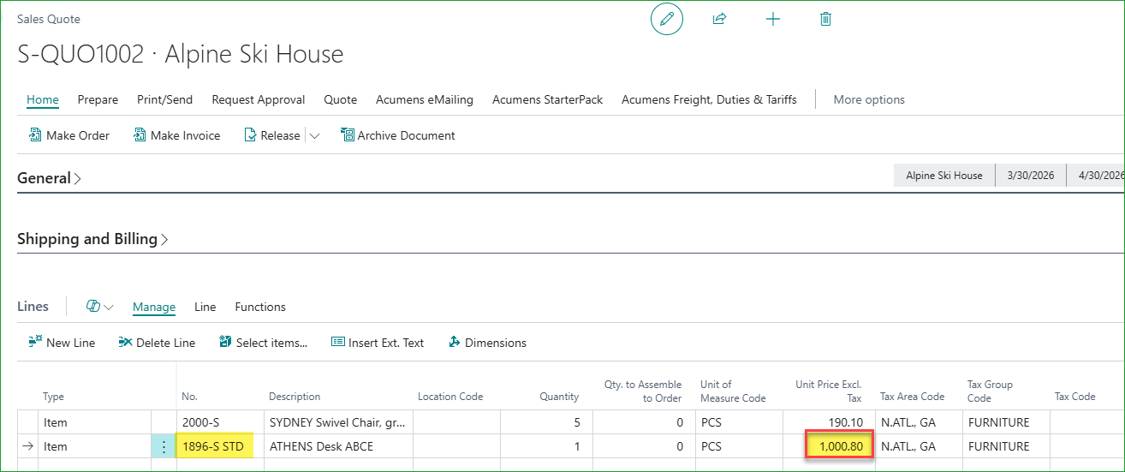
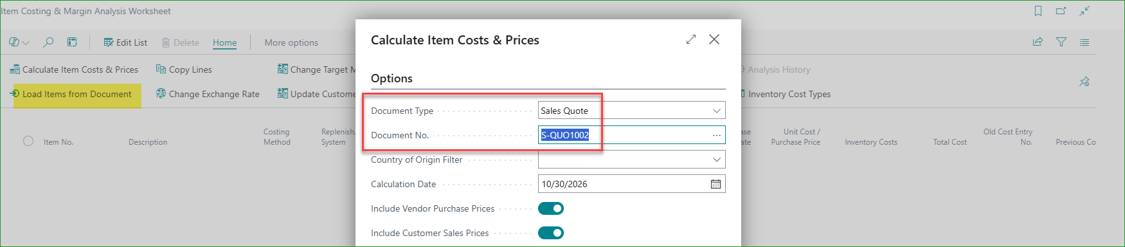
Load items from the Sales Quote to the analysis worksheet.
After review in the worksheet, update the new prices back to the Sales Quote.
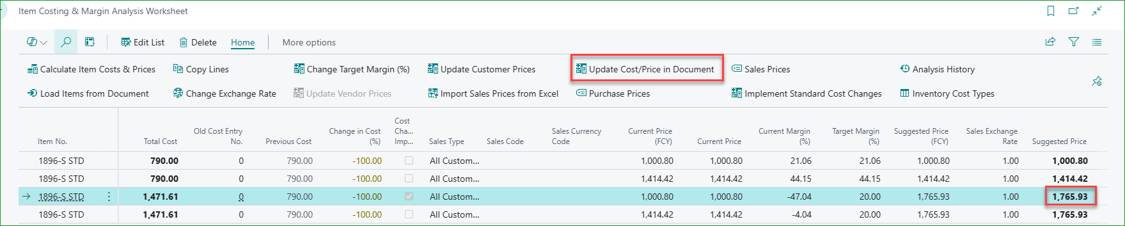
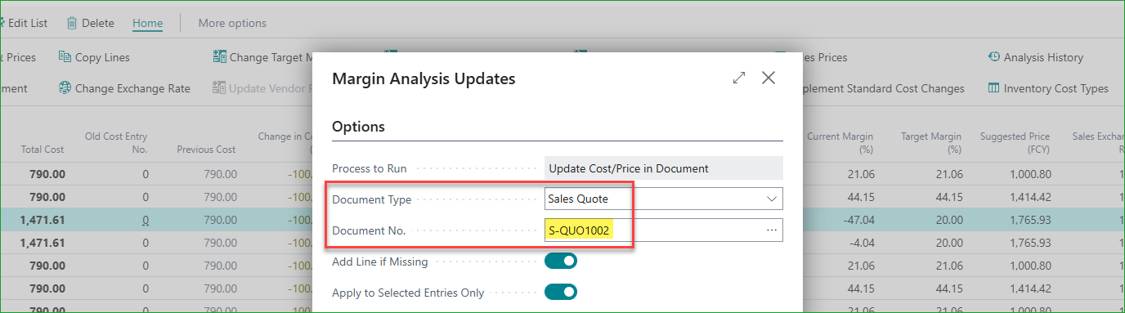
Updated price on Sales Quote.
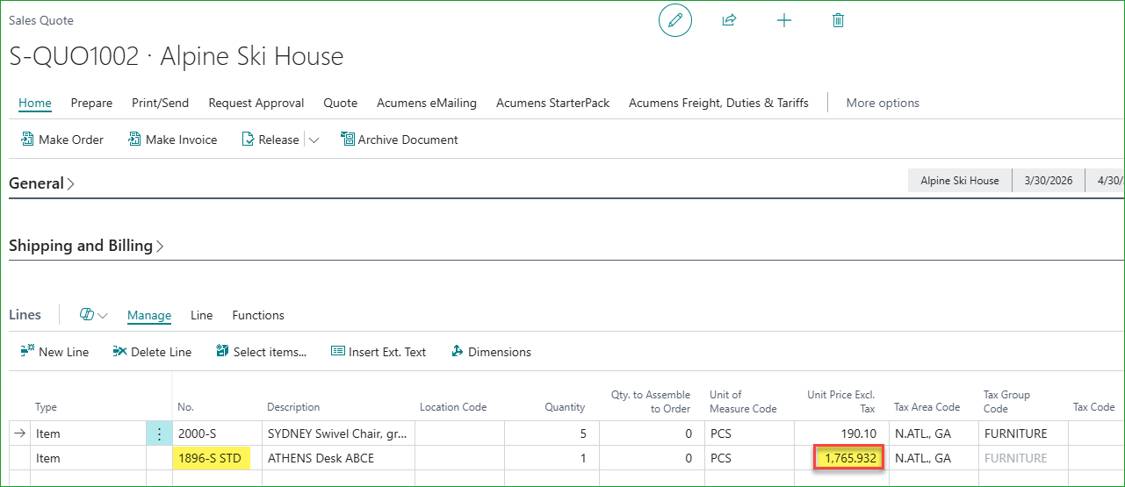
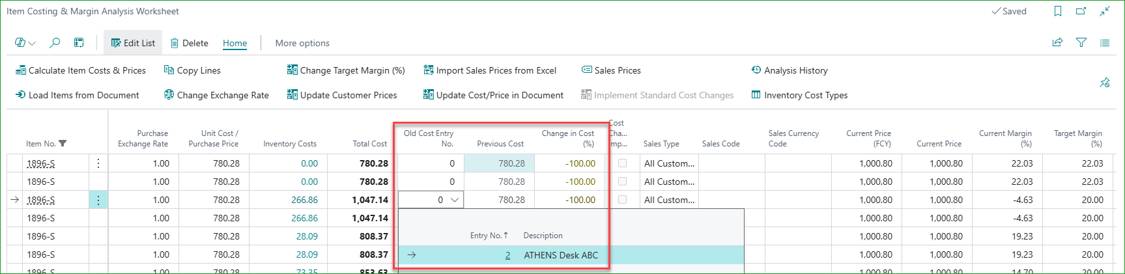
The company wants to maintain a history of landed cost changes to compare previous and current costs, calculate percentage increases, and determine appropriate price adjustments for customer price lists and quotes as duties, tariffs, and other inventory costs change.
The Acumens Freight, Duties & Tariffs App maintains a history of calculations in the Costing and Price Margin Analysis worksheet. Users can retrieve historical calculations, compare previous costs with current landed costs, and use the differences to determine appropriate price adjustments for customer price lists and quotes.

The company pays for outbound freight when they ship products to customers. The company wants to simplify outbound freight cost allocation on Purchase Invoices by automating the calculation of applicable freight charges and their assignment to the relevant sales shipments. The assignment is always based on volume.
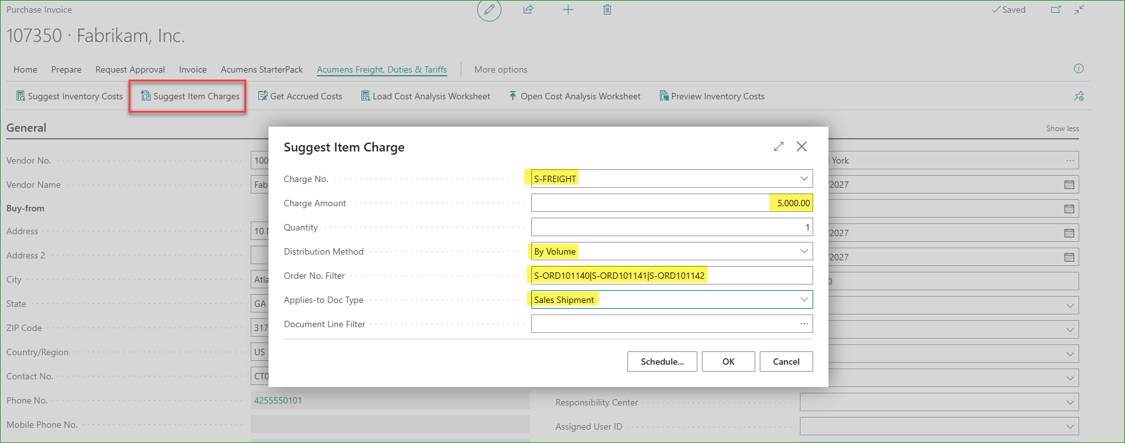
The Acumens Freight, Duties & Tariffs App provides the Suggest Item Charge action to simplify the allocation of outbound freight costs. Users select the relevant Item Charge, enter the total contracted freight amount, and specify the Sales Order numbers associated with the freight invoice. The app identifies the relevant posted Sales Shipments linked to the specified Sales Orders and automatically creates the corresponding Purchase Invoice line and Item Charge Assignment lines. The freight charge is distributed across the shipped items based on their respective volumes.
Example: Sales Orders S-ORD101140, S-ORD101141 and S-ORD101142 were shipped in the same container. The agreed freight charge for the container is $5,000 to be distributed by volume.
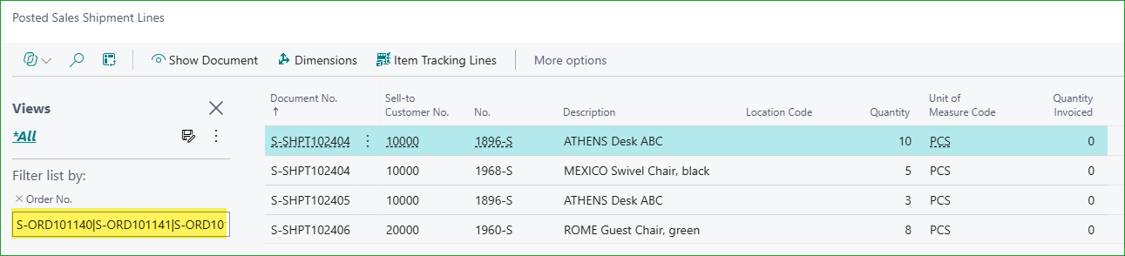
Suggest Item Charge – on a purchase invoice, specify the freight item charge, enter the amount, select the distribution method (volume by default) and enter the order number filters.
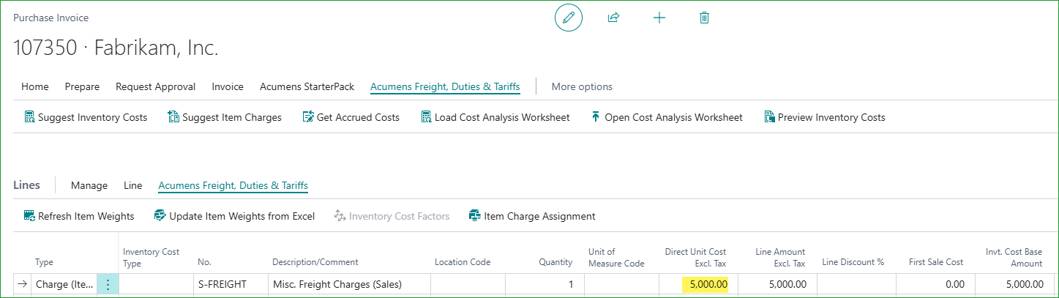
Purchase invoice line created/updated, costs calculated, and item charge assignment lines created and charges distributed automatically.
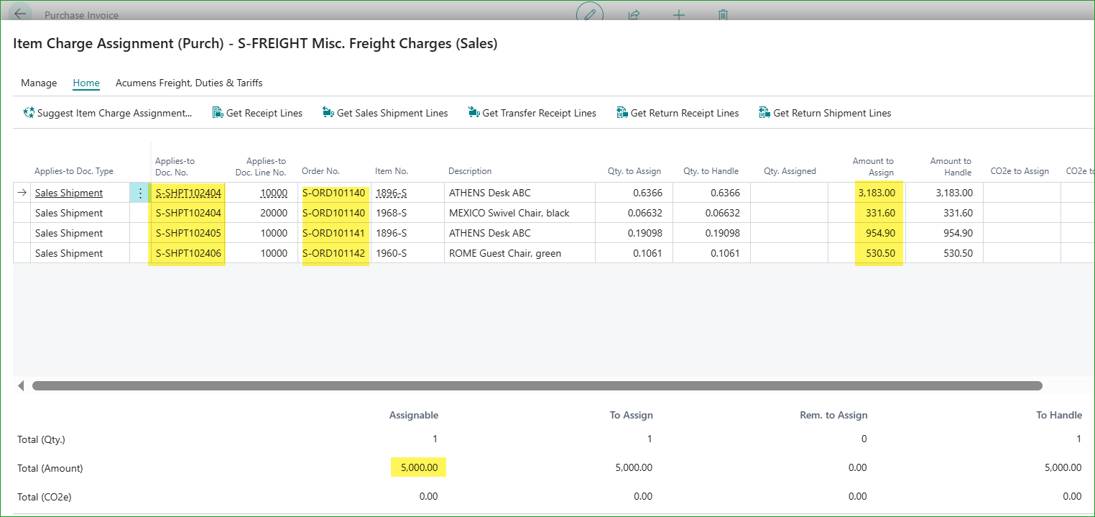
When invoice is posted, freight charges allocated to the sales shipments.