
Acumens Loading

Acumens STAR Events Rental

Event & party rental management for Microsoft Dynamics 365 Business Central

From the first quote to the last returned item: events, contracts, deposits, warehouse packing, truck dispatch, returns and invoicing, all working from the same live Business Central data.

Every step of your rental business, in one system

Sales, the warehouse, the trucks and finance share one database, so there's no double entry and nothing to reconcile between systems.

One connected workflow

Every order, start to finish

Each step hands over to the next automatically, from the first event enquiry to the final invoice.

EventVenue, dates and every linked quote and contract
QuoteFast multi-item entry, print or email
ContractRelease, lock, audit and archive
DepositFixed or percentage prepayments
PackPick tickets, scanning and priorities
CheckSecond-person quality check
LoadLast-on, first-off truck loading
DispatchRoutes, stops and a live board
ReturnCheck-in, damage and shortages
InvoiceCycle billing, fees and tax
Why STAR Events Rental

Built for how event rental really works

Events at the centre

One event links many quotes and contracts. Copy repeat events, push changes to every contract and cancel everything in one step.

A warehouse that keeps up

Packing, checking and loading stay in step with the contract. Late changes are flagged and shortages raise alerts at every stage.

Dispatch you can see

Routes, trucks and crews on a live dispatch board, with same-day delivery alerts and automatic delivery emails.

Finance built in

Deposits, fees, card surcharges, tax and cycle billing post straight to Business Central, with profit tracked per event.

Features

Everything you need, in one place

Sixteen feature areas covering the full event-rental cycle. Open any area to see what's included.

Event managementEvents, venues, copying and cascade updates
  • Events and venues: many quotes and contracts link to one event and pick up its details.
  • Copy event: copy an event together with its contracts, so repeat events are quick to set up.
  • Update linked contracts: push event changes to every contract in one action.
  • Event controller: mark the customer who manages the event.
  • Event overview: contract count with drill-down, plus the deposit position (invoiceable, posted and paid).
  • Event cancellation: cancels all contracts and releases their reservations automatically.
Quoting and contractsQuote-to-contract, release, locking and audit trail
  • Rental quotes: lines for items, assets, labour and fees; print or email.
  • Fast line entry: search, select several items at once, and lines are added in the order entered.
  • Quote-to-contract: convert one quote, or every quote for an event in one step.
  • Rental contracts: agreed quantity, rental days, unit price, and rental or sale lines.
  • Release and pricing: totals and tax calculated on release or on demand.
  • Contract locking: one editor at a time, so changes never collide.
  • Audit trail: header and line changes are logged.
  • Contract versioning: archived automatically on every print or email.
  • Warehouse notes: tagged comments flow to packing, checking and loading.
Accessories and upsellingSuggested items and protective covers
  • Suggested items: accessories, options and upsells pop up as lines are added, with required, no charge and require pick options.
  • Flexible alternative to kits: suggestions adapt to each order; items blocked for rental can be sold on the spot.
  • Protective covers: companion items added automatically with a quantity per unit, and kept in step with the contract.
Fees and surchargesContract fees and card surcharges
  • Contract fees: a default fee list on every contract, adjustable per contract and added on release.
  • Credit card surcharge: applied according to the payment method.
  • Automatic fee shipping: fee and labour lines ship automatically once the contract is signed.
Deposits and prepaymentsEvent or contract deposits, payments and reversals
  • Event or contract deposits: fixed amount or percentage, for example 50%.
  • One-click prepayment invoices: created and posted in one step.
  • Payment application: amount paid and paid-in-full shown on the event and contract.
  • Balance invoicing: collect the remaining balance before the event.
  • Prepayment reversal: every prepayment document listed in one place, with credit memos.
Re-rents (subrentals)Cover shortfalls from other suppliers
  • Re-rent purchase orders: rent the shortfall from a vendor when stock runs short.
  • Automatic return orders: created and kept in step with lines, quantities, return date and address.
  • Owned vs. re-rented stock: lot numbers assigned automatically so the two are always separate.
  • Re-rent logistics: vendor pickups and drop-offs on route stops, loading and unloading.
Crew and labour schedulingStaff planned alongside the equipment
  • Labour on contracts: staff and crew added as resource lines.
  • Resource planning: scheduling needed, completed and cancelled lists in a Resource Planning role centre.
Warehouse packingSimple packing or full pick tickets
  • Two packing modes: simple live pick lists, or full normal and bulk packing orders.
  • Pick assignment and priority: assign packers, priorities and packing sequence.
  • Fast quantity entry: tally an exact quantity or formula, or autofill in one click.
  • Serial number scanning: assign serialised assets by scan, with duplicate warnings.
  • Box counts, packer notes and pictures on every line.
  • Change detection: late contract changes highlighted, refreshed or rebuilt.
  • Shortage emails: notify the salesperson straight from the packing order.
Order checkingA second check before anything leaves
  • Checking orders: created from the packing order at a staging lane; can be made mandatory.
  • Verification tools: box counts, serial scans, tally, autofill and review totals.
  • All notes in one view: packer, checker and warehouse notes, plus pictures.
  • Ready to load: checked quantities written back to the contract.
Dispatch and routingRoutes, stops and a live dispatch board
  • Routes: stops, trucks, vehicle type, drivers, helpers and loaders.
  • Route stops: deliveries and pickups, shared stops for the same address, scan to assign.
  • Live dispatch board: self-refreshing tiles with a status picture per stop.
  • Same-day delivery monitor: lines turn red if no driver is assigned in time.
  • Delivery confirmation emails sent automatically when a stop is completed.
  • Driver box-count check: mismatches against the packed count are flagged.
  • Reschedule handling and route sheets.
Truck loadingLoad in the right order, ship on departure
  • Loading orders: built automatically from each route's delivery stops.
  • Last-on, first-off: reverse stop order with a recorded loading sequence.
  • Automatic shipment: departure posts the shipment and marks lines shipped.
  • Truck changes: swap trucks, or share a delivery route across several trucks.
  • Loading tiles: open orders, item, box and cover shortages, and completed orders.
Returns and check-inUnloading, damage and shortages
  • Unloading orders: filled automatically from the route's pickup stops.
  • Check-in tools: tally, autofill, serial scan and item category filters.
  • Damage and shortage notes for every unloading order.
  • Off-load report: flags returned items needed for upcoming jobs.
  • Automatic return posting and a return shortage list with reason codes.
  • Simple flow option: ship all and return all straight from the contract.
InvoicingBill exactly what was agreed
  • Rental invoices straight from the contract, with matching fees and tax.
  • Cycle billing: rental lines billed periodically until their off-rent date; sale lines once.
Automation and alertsRoutine work runs unattended
  • Scheduled processing: packing orders, loading and return posting, and emails run automatically.
  • Consolidated shortage alert: one list across packing, checking and loading that clears itself.
  • Automatic document flow: optional direct posting of dispatch tickets.
Setup and controlRules, numbering, roles and role centres
  • Central rental setup: lead times, route defaults, tax defaults and refresh intervals.
  • Document numbering for venues, events, routes, packing, checking, loading and unloading.
  • Event financial dimensions: profit reported per event in the general ledger.
  • Asset hierarchy: categories, models and serialised assets with inherited defaults.
  • User roles: manager, picker and night-user permissions.
  • Role centres and KPI tiles for dispatch and resource planning.
Business controlsMandatory fields and safeguards
  • Mandatory-field rules: required pick and return dates before a re-rent order is released.
  • Reservation control: reservations released automatically when contracts or events are cancelled.
  • Read-only by default: contracts must be checked out before editing.
The platform

One platform, one database

STAR Events Rental runs inside Microsoft Dynamics 365 Business Central, so it uses the ledgers, purchasing, item tracking and automation you already rely on.

  • No separate rental system to integrate or reconcile
  • Profit by event through financial dimensions
  • Owned and re-rented stock tracked by lot
  • Routine posting and emails run on the Job Queue
Acumens STAR Events RentalEvents, contracts, warehouse, dispatch
Extend with Acumens appse-Mailing, e-Payments, Flexible Commissions, Electronic signature
Microsoft Dynamics 365 Business CentralFinance, purchasing, inventory, Job Queue
Downloads

Take STAR Events Rental with you

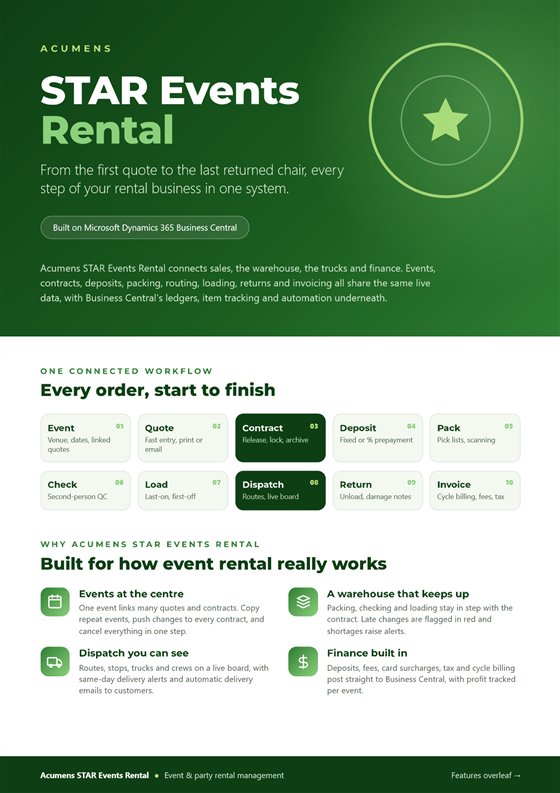
Share the details with your team: a two-page factsheet for a quick overview, or the full feature summary for every detail.
Cover of the Acumens STAR Events Rental factsheet
Factsheet

STAR Events Rental Factsheet

The essentials at a glance: the connected rental workflow, why it fits event rental, and all 16 feature areas.
PDF2 pages295 KB
Cover of the Acumens STAR Events Rental feature summary
Feature summary

STAR Events Rental Feature Summary

The complete guide: every feature across all 16 areas, from events and contracts to packing, dispatch, returns and invoicing.

PDF9 pages416 KB

See STAR Events Rental in action

Book a walkthrough with our team and see how it fits your rental operation.

Customer support team ready to assist you

Contact SupportContact

Contact Support for demo of the app or for assistance with setup and training

Sign UpSign Up

Sign up to receive updates on Acumens.com, new releases, and extension updates by filling in the form.